A7 Lite Arm
Documentation for the A7 Lite arm.
Quick Start
from realhand import A7lite

with A7lite(
    side="left",
    interface_name="can0",
) as arm:
    arm.enable()  # Enable all 7 joint motors
    arm.home()  # Move the arm to the zero position
    arm.disable()  # Disable all 7 joint motors
Constructor Parameters
| Parameter | Type | Default | Description |
|---|---|---|---|
side | "left" | "right" | required | Left arm or right arm |
interface_name | str | required | CAN interface name, such as "can0" |
interface_type | str | "socketcan" | CAN interface type |
tcp_offset | list[float] | [0.0, 0.0, 0.0] | TCP offset |
world_frame | "urdf" | "maestro" | "urdf" | World frame convention |
The constructor automatically checks whether all 7 motors are online.
Dependency requirement: A7 Lite relies on Pinocchio for kinematics. Install the optional kinetix dependency:
pip install "realhand[kinetix] @ git+https://github.com/RealHand-Robotics/realbot-python-sdk.git"
Windows users: Pinocchio does not support installation via
pipon Windows. Useconda install pinocchio -c conda-forge.
Exceptions:
ImportError: The optionalkinetixdependency (Pinocchio) is not installedValueError: Invalidsideorworld_frameargumentStateError: Motors did not respond on the CAN bus / report data timed out
URDF paths:
src/realhand/arm/kinetix/urdf/a7_lite__left.urdfanda7_lite__right.urdf
Coordinate Frames
A7 Lite supports two world coordinate frames selected by the world_frame parameter.
URDF Frame (default)
This is the coordinate system defined by the URDF model file. Its origin is at the midpoint of the line connecting the left and right shoulder joints, as shown below:
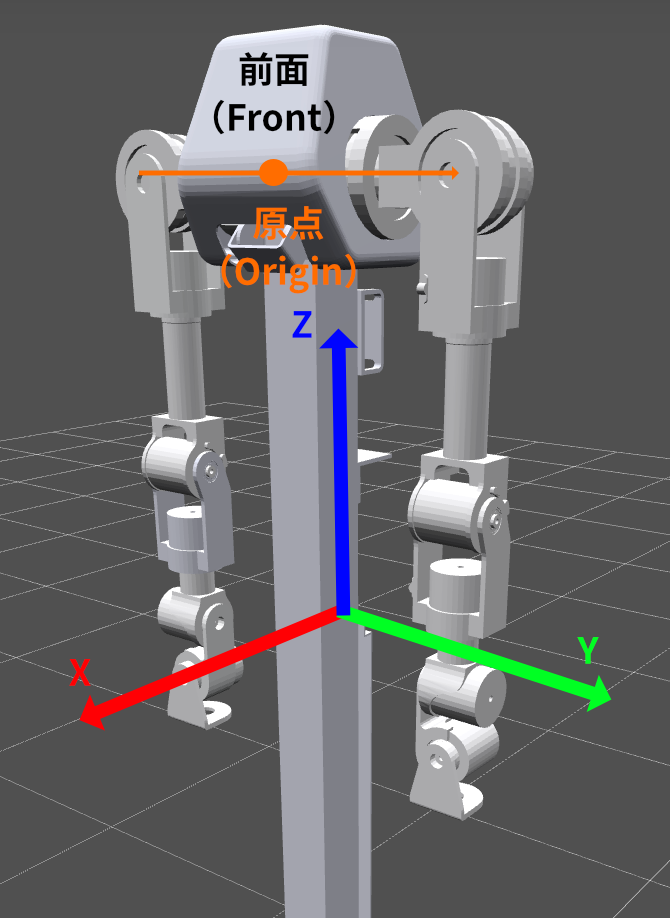
- X axis: Positive X points from the back of the robot toward the front
- Y axis: Positive Y points to the robot’s left side from the robot’s perspective (the viewer’s right when facing the robot)
- Z axis: Positive Z points upward by the right-hand rule
- Rx, Ry, Rz: Rotations are applied in Z, Y, X order, with counterclockwise as positive
Maestro Frame
The Maestro frame applies two transformations relative to the URDF frame, as shown below:
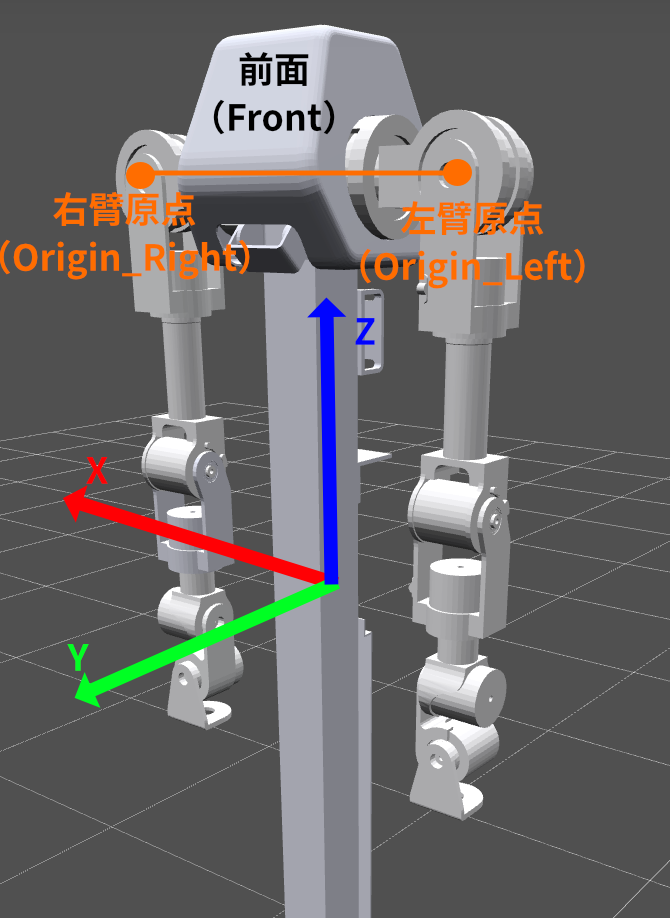
- Origin translation: Moves the world origin from the base center to the center of Joint 2 (the second shoulder joint)
- Rotate Z by 90°: Rotates the URDF axes counterclockwise by +90° around Z at the new origin
After the transformation:
- X axis: Positive X points to the robot’s right side from the robot’s perspective (the viewer’s left when facing the robot)
- Y axis: Positive Y points from the back of the robot toward the front
- Z axis: Positive Z points upward by the right-hand rule
Note: These coordinate definitions mainly affect the
Posevalues used bymove_pandmove_l. They do not affectmove_j.
Joint Definition
Zero Position
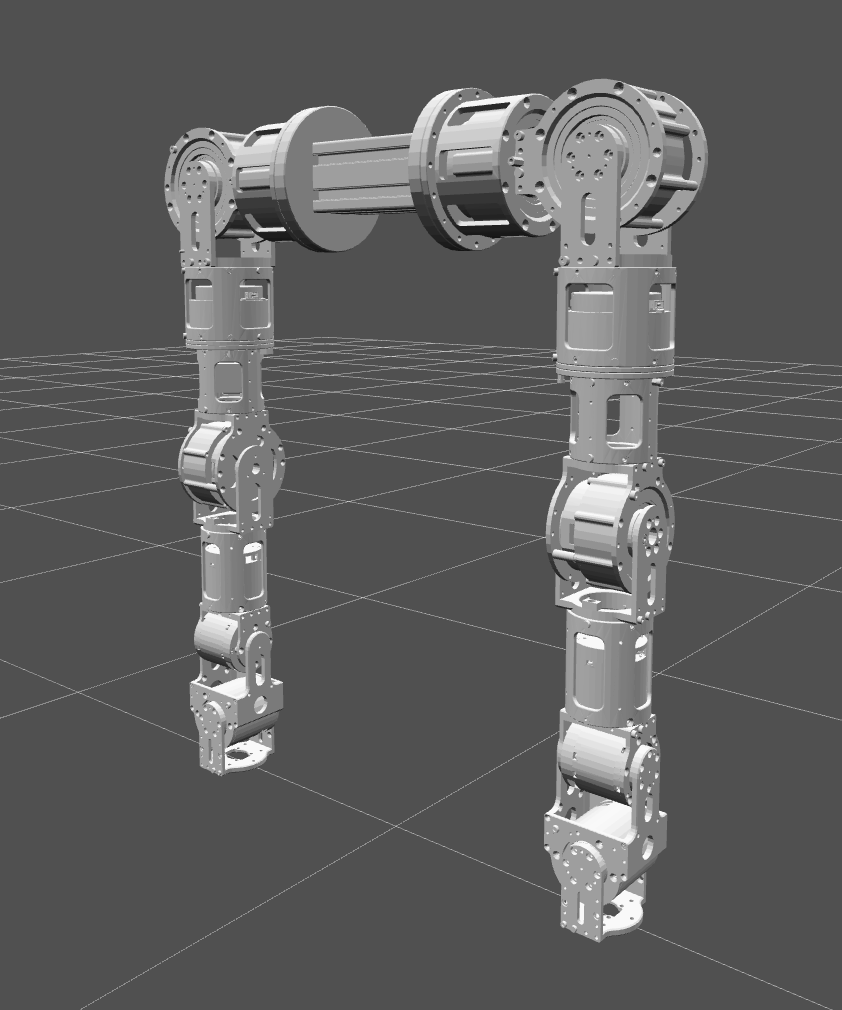
When all joint angles are [0.0, 0.0, 0.0, 0.0, 0.0, 0.0, 0.0], the arm should be in a natural hanging pose with joints perpendicular to each other. Call home() to return to the zero position, shown below:
Positive Rotation Direction
Positive joint angles follow the right-hand rule: point your right thumb along the positive rotation axis, and the direction in which your fingers curl is the positive direction.
Because some URDF joint axes are negative (for example 0 -1 0), the actual positive direction may be opposite to intuition:
- Axis
0 -1 0(negative Y): Increasing the angle rotates around negative Y, which appears clockwise when looking along the positive Y axis - Axis
-1 0 0(negative X): Increasing the angle rotates around negative X, which appears clockwise when looking along the positive X axis - Axis
0 0 1(positive Z): Increasing the angle rotates around positive Z, which appears counterclockwise when viewed from above
A7 Lite Left Arm Joint List (URDF frame)
| Index | Joint name | Physical meaning | Rotation axis (URDF) | Angle range (rad) |
|---|---|---|---|---|
| 0 | L1_JOINT | Shoulder pitch | Negative Y (0 -1 0) | [-2.18, 3.75] |
| 1 | L2_JOINT | Shoulder roll | Negative X (-1 0 0) | [-3.33, 0.19] |
| 2 | L3_JOINT | Shoulder yaw (upper-arm twist) | Positive Z (0 0 1) | [-2.26, 2.26] |
| 3 | L4_JOINT | Elbow pitch | Negative Y (0 -1 0) | [-0.78, 1.74] |
| 4 | L5_JOINT | Elbow yaw (forearm twist) | Positive Z (0 0 1) | [-2.96, 2.96] |
| 5 | L6_JOINT | Wrist pitch | Negative Y (0 -1 0) | [-1.57, 1.57] |
| 6 | L7_JOINT | Wrist roll | Negative X (-1 0 0) | [-1.57, 1.57] |
A7 Lite Right Arm Joint List (URDF frame)
| Index | Joint name | Physical meaning | Rotation axis (URDF) | Angle range (rad) |
|---|---|---|---|---|
| 0 | R1_JOINT | Shoulder pitch | Positive Y (0 1 0) | [-3.75, 2.18] |
| 1 | R2_JOINT | Shoulder roll | Negative X (-1 0 0) | [-0.19, 3.33] |
| 2 | R3_JOINT | Shoulder yaw (upper-arm twist) | Positive Z (0 0 1) | [-2.26, 2.26] |
| 3 | R4_JOINT | Elbow pitch | Positive Y (0 1 0) | [-1.74, 0.78] |
| 4 | R5_JOINT | Elbow yaw (forearm twist) | Positive Z (0 0 1) | [-2.96, 2.96] |
| 5 | R6_JOINT | Wrist pitch | Positive Y (0 1 0) | [-1.57, 1.57] |
| 6 | R7_JOINT | Wrist roll | Negative X (-1 0 0) | [-1.57, 1.57] |
Pose (TCP Pose) Representation
Pose represents the TCP (Tool Center Point) pose. It is a Pydantic model with 6 fields:
from realhand import Pose

pose = Pose(x=0.3, y=0.1, z=0.5, rx=0.0, ry=0.5, rz=0.0)
| Field | Meaning | Unit |
|---|---|---|
x, y, z | Cartesian position | meters (m) |
rx | Rotation about X (roll), range [-π, π] | radians (rad) |
ry | Rotation about Y (pitch), range [-π/2, π/2] | radians (rad) |
rz | Rotation about Z (yaw), range [-π, π] | radians (rad) |
- Orientation uses extrinsic ZYX Euler angles: rotate around the world Z axis by
rz, then the world Y axis byry, and finally the world X axis byrx.
Lifecycle Management
API Reference
| Method | Description |
|---|---|
enable() | Enables all 7 joint motors. This causes a brief disable/enable cycle. |
disable() | Disables all 7 joint motors. |
emergency_stop() | Performs an emergency stop. This method blocks for about 2 seconds. |
calibrate_zero() | Sets the current position as zero. The arm must be disabled. |
reset_error() | Resets error states on all joints. |
close() | Closes the connection: waits for motion to finish and then stops the CAN scheduler. Called automatically when using with. |
Notes
- Calling
arm.enable()causes a brief disable/enable cycle. - The arm must be disabled before setting the zero position.
emergency_stop()is blocking and waits for about 2 seconds.
Control Mode
Only PP (Profile Position) mode is currently supported. It is configured automatically when enable() is called.
You can import the ControlMode enum from realhand:
from realhand import ControlMode
CAN Bus
interface_name specifies the CAN interface name (for example "can0"), and interface_type specifies the interface type (default "socketcan").
For more information, including Windows usage, see CAN Bus Configuration.
Functional Modules
| Module | Docs |
|---|---|
Motion control (move_j/move_p/move_l) | motion.md |
| Kinematics (FK / IK / joint limits) | kinematics.md |
| State reading (angles / speeds / torques / temperatures) | state.md |
| Parameter configuration (speed / acceleration / PID) | config.md |