Installation
Install with pip / uv:
# pip
pip install git+https://github.com/RealHand-Robotics/realbot-python-sdk.git

# uv
uv add "realhand @ git+https://github.com/RealHand-Robotics/realbot-python-sdk.git"
Or install explicitly from the Git repository:
# pip
pip install git+https://github.com/RealHand-Robotics/realbot-python-sdk.git

# uv
uv add "realhand @ git+https://github.com/RealHand-Robotics/realbot-python-sdk.git"
Optional Dependencies
Kinetix (Kinematics, required for arms)
Arms (A7 / A7 Lite) rely on Pinocchio for kinematics and require an extra installation:
# pip (Linux / macOS)
pip install "realhand[kinetix] @ git+https://github.com/RealHand-Robotics/realbot-python-sdk.git"

# uv
uv add "realhand[kinetix] @ git+https://github.com/RealHand-Robotics/realbot-python-sdk.git"
Windows users: Pinocchio does not support installation via
pipon Windows. Use Conda instead:conda install pinocchio -c conda-forge
If you only use dexterous hands (L6 / L20Lite / L20 / L25, etc.), this dependency is not required.
Quick Start
Connect to a Dexterous Hand
from realhand import L6

with L6(side="left", interface_name="can0") as hand:
    # Control and read the hand
    pass
Use a with statement to ensure resources are released correctly.
Control Joint Angles
Set target angles for the 6 joints (range 0-100):
from realhand import L6

with L6(side="left", interface_name="can0") as hand:
    # Open the hand
    hand.angle.set_angles([100, 50, 100, 100, 100, 100])

    # Close into a fist
    hand.angle.set_angles([0, 0, 0, 0, 0, 0])
Joint order: [thumb_flex, thumb_abd, index, middle, ring, pinky]
Read Angles
with L6(side="left", interface_name="can0") as hand:
    # Blocking read
    data = hand.angle.get_blocking(timeout_ms=100)
    print(f"Current angles: {data.angles.to_list()}")

    # Access a single joint
    print(f"Index finger: {data.angles.index}")
Read Force Sensors
Get force sensor data from all 5 fingers:
with L6(side="left", interface_name="can0") as hand:
    data = hand.force_sensor.get_blocking(timeout_ms=1000)

    # Access per-finger data
    print(f"Thumb: {data.thumb.values.shape}")  # (12, 6)
    print(f"Index: {data.index.values.shape}")
Streaming Reads
Continuously receive data through the unified event stream. Polling starts automatically at initialization with default intervals (angles at 60 Hz, force sensors at 30 Hz). You can override that by calling start_polling() manually:
from realhand.hand.l6 import SensorSource, AngleEvent

with L6(side="left", interface_name="can0") as hand:
    # Default polling has already started automatically (angle + force sensor)
    # Call start_polling() again if you want custom settings
    hand.start_polling({SensorSource.ANGLE: 0.1})

    for event in hand.stream():
        match event:
            case AngleEvent(data=data):
                print(f"Angles: {data.angles.to_list()}")

        if should_stop():
            break

    hand.stop_polling()
    hand.stop_stream()
Complete Example
from realhand import L6
import time

with L6(side="left", interface_name="can0") as hand:
    # Set speed
    hand.speed.set_speeds([50, 50, 50, 50, 50, 50])

    # Open
    hand.angle.set_angles([100, 50, 100, 100, 100, 100])
    time.sleep(1)

    # Close
    hand.angle.set_angles([0, 0, 0, 0, 0, 0])
    time.sleep(1)

    # Read state
    angles = hand.angle.get_blocking()
    temps = hand.temperature.get_blocking()

    print(f"Angles: {angles.angles.to_list()}")
    print(f"Temperature: {temps.temperatures.to_list()} °C")
Next Steps
- Basics - Understand the SDK architecture
- Angle Control - Detailed API
- Force Sensors - Force sensor details
Basics
Architecture Overview
The SDK uses a modular design. All features are accessed through the main class:
L6
├── hand.angle          # Angle control
├── hand.speed          # Speed control
├── hand.torque         # Torque control
├── hand.current        # Current reading
├── hand.temperature    # Temperature reading
├── hand.force_sensor   # Force sensors
├── hand.fault          # Fault handling
└── hand.version        # Version information
Calling Convention
All features are called through hand.module.method():
from realhand import L6

with L6(side="left", interface_name="can0") as hand:
    hand.angle.set_angles([50, 50, 50, 50, 50, 50])
    hand.speed.set_speeds([100, 100, 100, 100, 100, 100])

    data = hand.temperature.get_blocking()
Type Safety
The SDK provides typed data classes with IDE autocompletion support:
from realhand import L6
from realhand.hand.l6 import L6Angle

with L6(side="left", interface_name="can0") as hand:
    # Use a data class (recommended, with type hints)
    angle = L6Angle(thumb_flex=50, thumb_abd=30, index=60, middle=60, ring=60, pinky=60)
    hand.angle.set_angles(angle)

    # Or use a list (more concise)
    hand.angle.set_angles([50, 30, 60, 60, 60, 60])
Data class fields:
| Field | Description |
|---|---|
thumb_flex | Thumb flexion |
thumb_abd | Thumb abduction |
index | Index finger |
middle | Middle finger |
ring | Ring finger |
pinky | Pinky |
Data Reading Modes
Blocking Read
Send a request and wait for a response:
data = hand.angle.get_blocking(timeout_ms=100)
Cached Read
Get the most recently received data without blocking:
data = hand.angle.get_snapshot()
if data is not None:
    print(data.angles)
Streaming Read
Continuously receive data from the unified event stream:
from realhand.hand.l6 import SensorSource, AngleEvent

hand.start_polling({SensorSource.ANGLE: 0.1})

for event in hand.stream():
    match event:
        case AngleEvent(data=data):
            print(data.angles)
    if should_stop():
        break

hand.stop_polling()
hand.stop_stream()
Snapshot
Get the latest cached values from all sensors:
snap = hand.get_snapshot()
print(snap.angle)  # AngleData | None
print(snap.temperature)  # TemperatureData | None
Resource Management
Use a with statement to manage resources automatically:
with L6(side="left", interface_name="can0") as hand:
    # Use the hand
    pass
# Resources are released automatically
Or manage the lifecycle manually:
hand = L6(side="left", interface_name="can0")
try:
    # Use the hand
    pass
finally:
    hand.close()
Exception Handling
from realhand import L6
from realhand.exceptions import TimeoutError, ValidationError

with L6(side="left", interface_name="can0") as hand:
    try:
        data = hand.angle.get_blocking(timeout_ms=100)
    except TimeoutError:
        print("Read timed out")
    except ValidationError as e:
        print(f"Invalid parameter: {e}")
| Exception | Description |
|---|---|
TimeoutError | Communication timeout |
ValidationError | Parameter validation failed |
StateError | Invalid state, such as a closed device |
Joint Indexing
All 6-joint modules use the same index order:
| Index | Name | Identifier |
|---|---|---|
| 0 | Thumb flexion | thumb_flex |
| 1 | Thumb abduction | thumb_abd |
| 2 | Index finger | index |
| 3 | Middle finger | middle |
| 4 | Ring finger | ring |
| 5 | Pinky | pinky |
CAN Bus
L6/O6 dexterous hands communicate over the CAN bus. The interface_type parameter in the constructor selects the CAN adapter type.
Constructor Parameters
from realhand import L6

hand = L6(
    side="left",  # "left" or "right"
    interface_name="can0",  # Interface name
    interface_type="socketcan",  # Adapter type
)
| Parameter | Description |
|---|---|
side | Left hand "left" or right hand "right" |
interface_name | Interface name, depending on OS and adapter |
interface_type | CAN adapter type, defaults to "socketcan" |
Linux (SocketCAN)
Linux uses SocketCAN by default, so you do not need to specify interface_type.
hand = L6(side="left", interface_name="can0")
Configure the CAN interface:
sudo ip link set can0 type can bitrate 1000000
sudo ip link set can0 up
To connect multiple CAN interfaces: Linux names interfaces in creation order, so depending on the order in which CAN adapters are connected to the control board, they will be named can0, can1, can2, and so on. You can bring up multiple CAN interfaces by running the following commands in sequence:
sudo ip link set can0 type can bitrate 1000000 && sudo ip link set can0 up && \
sudo ip link set can1 type can bitrate 1000000 && sudo ip link set can1 up && \
sudo ip link set can2 type can bitrate 1000000 && sudo ip link set can2 up
# ...
Windows (PCAN)
Use a PCAN adapter on Windows:
hand = L6(side="left", interface_name="PCAN_USBBUS1", interface_type="pcan")
For other adapter types, see the python-can documentation.
L6 Dexterous Hand
Quick Start
from realhand import L6

with L6(side="left", interface_name="can0") as hand:
    # Set angles
    hand.angle.set_angles((10, 20, 30, 40, 50, 60))

    # Read angles
    data = hand.angle.get_blocking(timeout_ms=500)
    print(data.angles)
Constructor parameters
| Parameter | Type | Description |
|---|---|---|
side | "left" | "right" | Left hand or right hand |
interface_name | str | CAN interface name, such as "can0" |
interface_type | str | CAN interface type, default "socketcan". See CAN Bus for Windows usage |
Joint Definition
| Index | Name | Identifier |
|---|---|---|
| 0 | Thumb flexion | thumb_flex |
| 1 | Thumb abduction | thumb_abd |
| 2 | Index finger | index |
| 3 | Middle finger | middle |
| 4 | Ring finger | ring |
| 5 | Pinky | pinky |
Functional Modules
| Module | Description | Docs |
|---|---|---|
hand.angle | Joint angle control and read | angle |
hand.speed | Motion speed control | speed |
hand.torque | Torque control | torque |
hand.force_sensor | Force sensor data | force-sensor |
hand.temperature | Temperature monitoring | temperature |
hand.current | Current monitoring | current |
hand.fault | Fault detection and clearing | fault |
hand.version | Device version information | version |
Unified Streaming Reads
L6 provides a unified event stream interface. Use hand.stream() and hand.start_polling() to retrieve data from all sensors. Polling starts automatically at initialization using default intervals (angles at 60 Hz, force sensors at 30 Hz), so you do not need to call start_polling() manually.
from realhand import L6
from realhand.hand.l6 import SensorSource, AngleEvent, TemperatureEvent

with L6(side="left", interface_name="can0") as hand:
    # You can set multiple sensors and polling intervals (seconds)
    # Calling start_polling() again overrides the previous settings
    hand.start_polling({SensorSource.ANGLE: 0.05, SensorSource.TEMPERATURE: 1.0})

    for event in hand.stream():
        match event:
            case AngleEvent(data=ad):
                print(f"Angles: {ad.angles.to_list()}")
            case TemperatureEvent(data=td):
                print(f"Temperature: {td.temperatures.to_list()}")

    hand.stop_polling()
    hand.stop_stream()
Available SensorSource values and default rates
| Value | Description | Default rate |
|---|---|---|
SensorSource.ANGLE | Angles | 60 Hz |
SensorSource.TORQUE | Torque | Not polled by default |
SensorSource.TEMPERATURE | Temperature | Not polled by default |
SensorSource.CURRENT | Current | Not polled by default |
SensorSource.FAULT | Fault | Not polled by default |
SensorSource.FORCE_SENSOR | Force sensors | 30 Hz |
Snapshot
Get the latest cached data from all sensors:
snap = hand.get_snapshot()
print(snap.angle)  # AngleData | None
print(snap.temperature)  # TemperatureData | None
Angle Control
Use hand.angle to control and read the 6 joint motor angles of the L6 dexterous hand.
- Angle range: 0-100
- Unit: Unitless, mapped to actual joint motor angles
Set Angles
from realhand import L6
from realhand.hand.l6 import L6Angle

# Using a list
hand.angle.set_angles([50.0, 30.0, 60.0, 60.0, 60.0, 60.0])

# Using an L6Angle object
angles = L6Angle(
    thumb_flex=50.0,  # Thumb flexion
    thumb_abd=30.0,  # Thumb abduction
    index=60.0,  # Index finger
    middle=60.0,  # Middle finger
    ring=60.0,  # Ring finger
    pinky=60.0,  # Pinky
)
hand.angle.set_angles(angles)
Read Angles
Blocking Read
from realhand import L6
from realhand.exceptions import TimeoutError

try:
    data = hand.angle.get_blocking(timeout_ms=500)
    print(f"Thumb flexion: {data.angles.thumb_flex}")
    print(f"All angles: {data.angles.to_list()}")
except TimeoutError:
    print("Read timed out")
Cached Read
data = hand.angle.get_snapshot()
if data:
    print(f"Angles: {data.angles.to_list()}")
    print(f"Timestamp: {data.timestamp}")
Streaming Read
Receive all sensor events through the top-level hand.stream() interface:
from realhand.hand.l6 import SensorSource, AngleEvent

hand.start_polling({SensorSource.ANGLE: 0.1})

for event in hand.stream():
    match event:
        case AngleEvent(data=data):
            print(f"Angles: {data.angles.to_list()}")

hand.stop_polling()
hand.stop_stream()
Complete Example
from realhand import L6

with L6(side="left", interface_name="can0") as hand:
    # Set angles
    hand.angle.set_angles([0.0, 0.0, 0.0, 0.0, 0.0, 0.0])

    # Read current angles
    data = hand.angle.get_blocking(timeout_ms=500)
    print(f"Current angles: {data.angles.to_list()}")

    # Incremental motion
    for i in range(0, 101, 10):
        hand.angle.set_angles([float(i)] * 6)
Speed Control
Control the motion speed of each joint motor on the L6 dexterous hand.
Set Speed
hand.speed.set_speeds(speeds)
Set the target speed for all 6 joint motors.
Parameter:
speeds: AnL6Speedinstance or a 6-element list, with values in the range 0-100 (unitless)
Finger order: thumb flexion, thumb abduction, index finger, middle finger, ring finger, pinky
Examples
List Form
from realhand import L6

with L6(side="left", interface_name="can0") as hand:
    # Set all fingers to medium speed
    hand.speed.set_speeds([50.0, 50.0, 50.0, 50.0, 50.0, 50.0])
L6Speed Form
from realhand import L6
from realhand.hand.l6 import L6Speed

with L6(side="left", interface_name="can0") as hand:
    # Thumb slow, other fingers fast
    speed = L6Speed(
        thumb_flex=30.0, thumb_abd=30.0, index=80.0, middle=80.0, ring=80.0, pinky=80.0
    )
    hand.speed.set_speeds(speed)
Torque Control
Overview
Use hand.torque for torque control. It supports setting target torque values and reading the current torque.
Torque values range from 0-100 (unitless, representing the relative torque percentage of the joint motors) for the 6 joint motors of the L6 dexterous hand:
| Index | Field | Joint |
|---|---|---|
| 0 | thumb_flex | Thumb flexion |
| 1 | thumb_abd | Thumb abduction |
| 2 | index | Index finger |
| 3 | middle | Middle finger |
| 4 | ring | Ring finger |
| 5 | pinky | Pinky |
Set Torque
# Using a list
hand.torque.set_torques([50.0, 30.0, 60.0, 60.0, 60.0, 60.0])

# Using an L6Torque object
from realhand.hand.l6 import L6Torque

target = L6Torque(
    thumb_flex=50.0, thumb_abd=30.0, index=60.0, middle=60.0, ring=60.0, pinky=60.0
)
hand.torque.set_torques(target)
Read Torque
Blocking Read
Send a request and wait for the response:
from realhand.exceptions import TimeoutError

try:
    data = hand.torque.get_blocking(timeout_ms=500)
    print(f"Thumb flexion: {data.torques.thumb_flex}")
    print(f"Index finger: {data.torques.index}")
except TimeoutError:
    print("Read timed out")
Cached Read
Get the most recent cached value without blocking:
data = hand.torque.get_snapshot()
if data:
    print(f"Torque: {data.torques.to_list()}")
Streaming Read
Receive all sensor events through the top-level hand.stream() interface:
from realhand.hand.l6 import SensorSource, TorqueEvent

hand.start_polling({SensorSource.TORQUE: 0.05})

for event in hand.stream():
    match event:
        case TorqueEvent(data=data):
            print(f"Torque: {data.torques.to_list()}")

hand.stop_polling()
hand.stop_stream()
Examples
Full Control Flow
from realhand import L6
from realhand.hand.l6 import L6Torque

with L6(side="left", interface_name="can0") as hand:
    # Set torque
    hand.torque.set_torques([50.0, 30.0, 60.0, 60.0, 60.0, 60.0])

    # Blocking read of current torque
    data = hand.torque.get_blocking(timeout_ms=200)
    print(f"Current torque: {data.torques.to_list()}")
Real-Time Monitoring
from realhand import L6
from realhand.hand.l6 import SensorSource, TorqueEvent

with L6(side="left", interface_name="can0") as hand:
    hand.start_polling({SensorSource.TORQUE: 0.1})

    try:
        for event in hand.stream():
            match event:
                case TorqueEvent(data=data):
                    if data.torques.index > 80:
                        print("Index joint motor torque is too high")
                        break
    finally:
        hand.stop_polling()
        hand.stop_stream()
Current Reading
from realhand import L6
Read the real-time current of the six L6 joint motors in mA.
Overview
Use hand.current to read current values. Three access patterns are supported:
| Mode | Method | Use case |
|---|---|---|
| Blocking read | get_blocking() | Single query |
| Streaming | hand.stream() | Continuous monitoring |
| Cached read | get_snapshot() | Read latest cache |
Read Current
Blocking Read
Send a request and wait for a response:
data = hand.current.get_blocking(timeout_ms=500)

# Access per-joint current values (mA)
print(data.currents.thumb_flex)  # Thumb flexion
print(data.currents.thumb_abd)  # Thumb abduction
print(data.currents.index)  # Index finger
print(data.currents.middle)  # Middle finger
print(data.currents.ring)  # Ring finger
print(data.currents.pinky)  # Pinky

# Index access
print(data.currents[0])  # thumb_flex
Parameter:
timeout_ms: Timeout in milliseconds, default100
Exception:
TimeoutError: No response received before timeout
Cached Read
Get the most recent cached data without sending a request:
data = hand.current.get_snapshot()
if data:
    print(f"Current: {data.currents.to_list()}")
Streaming Read
Receive all sensor events through the top-level hand.stream() interface:
from realhand.hand.l6 import SensorSource, CurrentEvent

hand.start_polling({SensorSource.CURRENT: 0.05})

for event in hand.stream():
    match event:
        case CurrentEvent(data=data):
            print(f"Current: {data.currents.to_list()}")

hand.stop_polling()
hand.stop_stream()
Examples
Detect Overcurrent
from realhand import L6
from realhand.hand.l6 import SensorSource, CurrentEvent

with L6(side="left", interface_name="can0") as hand:
    hand.start_polling({SensorSource.CURRENT: 0.05})

    try:
        for event in hand.stream():
            match event:
                case CurrentEvent(data=data):
                    for i, current in enumerate(data.currents.to_list()):
                        if current > 1000:
                            print(f"Warning: joint {i} current is too high ({current} mA)")
    finally:
        hand.stop_polling()
        hand.stop_stream()
Log Current Data
import time
from realhand import L6
from realhand.hand.l6 import SensorSource, CurrentEvent

with L6(side="left", interface_name="can0") as hand:
    records = []
    start = time.time()
    hand.start_polling({SensorSource.CURRENT: 0.1})

    try:
        for event in hand.stream():
            match event:
                case CurrentEvent(data=data):
                    records.append(
                        {
                            "time": data.timestamp - start,
                            "currents": data.currents.to_list(),
                        }
                    )
            if time.time() - start > 5:  # Record for 5 seconds
                break
    finally:
        hand.stop_polling()
        hand.stop_stream()

    print(f"Collected {len(records)} records")
Temperature Reading
Overview
Use hand.temperature to read the temperature data of the 6 L6 joint motors in °C.
Temperature fields
| Field | Description |
|---|---|
thumb_flex | Thumb flexion motor |
thumb_abd | Thumb abduction motor |
index | Index finger motor |
middle | Middle finger motor |
ring | Ring finger motor |
pinky | Pinky motor |
Read Temperature
Blocking Read
data = hand.temperature.get_blocking(timeout_ms=500)
print(f"Thumb temperature: {data.temperatures.thumb_flex}°C")
Parameter
timeout_ms: Timeout in milliseconds, default100
Return value
TemperatureData: Containstemperaturesandtimestamp
Exception
TimeoutError: No response before timeout
Cached Read
Read the most recent cached temperature data without blocking.
data = hand.temperature.get_snapshot()
if data:
    print(f"Temperature: {data.temperatures.to_list()}")
Return value
TemperatureDataorNoneif no cached data is available
Streaming Read
Receive all sensor events through the top-level hand.stream() interface:
from realhand.hand.l6 import SensorSource, TemperatureEvent

hand.start_polling({SensorSource.TEMPERATURE: 0.1})

for event in hand.stream():
    match event:
        case TemperatureEvent(data=data):
            print(f"Temperature: {data.temperatures.to_list()}")

hand.stop_polling()
hand.stop_stream()
Examples
Read All Joint Temperatures
from realhand import L6

with L6(side="left", interface_name="can0") as hand:
    data = hand.temperature.get_blocking(timeout_ms=500)

    # Access by field
    print(f"Thumb flexion: {data.temperatures.thumb_flex}°C")
    print(f"Index finger: {data.temperatures.index}°C")

    # Convert to list
    temps = data.temperatures.to_list()
    print(f"All temperatures: {temps}")

    # Index access
    print(f"First joint motor: {data.temperatures[0]}°C")
Temperature Monitoring
from realhand import L6
from realhand.hand.l6 import SensorSource, TemperatureEvent

with L6(side="left", interface_name="can0") as hand:
    hand.start_polling({SensorSource.TEMPERATURE: 0.1})

    try:
        for event in hand.stream():
            match event:
                case TemperatureEvent(data=data):
                    for i, temp in enumerate(data.temperatures.to_list()):
                        if temp > 60.0:
                            print(f"Warning: joint motor {i} is overheating ({temp}°C)")
    except KeyboardInterrupt:
        pass
    finally:
        hand.stop_polling()
        hand.stop_stream()
Force Sensors
The L6 dexterous hand is equipped with force sensors on 5 fingers (thumb, index, middle, ring, pinky). It supports both blocking and cached reads.
Overview
Use hand.force_sensor to access force sensor data:
from realhand import L6

with L6(side="left", interface_name="can0") as hand:
    data = hand.force_sensor.get_blocking()
Data Structures
ForceSensorData - sensor data for one finger:
values: A NumPy array of shape(12, 6)with dtypeuint8timestamp: Unix timestamp
AllFingersData - data for all 5 fingers:
thumb,index,middle,ring,pinky: theForceSensorDatafor each finger
Read Data
Blocking Read
data = hand.force_sensor.get_blocking(timeout_ms=1000)
print(data.thumb.values)  # Thumb data
print(data.index.values)  # Index data
| Parameter | Type | Default | Description |
|---|---|---|---|
timeout_ms | float | 1000 | Timeout in milliseconds |
Exceptions: TimeoutError (timeout), ValidationError (invalid parameter)
Cached Read
Get the most recently received data without blocking:
data = hand.force_sensor.get_snapshot()
if data:
    print(f"Thumb: {data.thumb.values[0]}")
    print(f"Index: {data.index.values[0]}")
Return value: AllFingersData or None if any finger is missing data
Streaming Read
Receive all sensor events through the top-level hand.stream() interface:
from realhand.hand.l6 import SensorSource, ForceSensorEvent

hand.start_polling({SensorSource.FORCE_SENSOR: 0.1})

for event in hand.stream():
    match event:
        case ForceSensorEvent(data=data):
            print(data.thumb.values)

hand.stop_polling()
hand.stop_stream()
Examples
Blocking Read for All Fingers
from realhand import L6

with L6(side="left", interface_name="can0") as hand:
    data = hand.force_sensor.get_blocking(timeout_ms=1000)
    print(f"Thumb: {data.thumb.values.shape}")  # (12, 6)
    print(f"Index: {data.index.values.shape}")
Stream for a Fixed Duration
import time
from realhand import L6
from realhand.hand.l6 import SensorSource, ForceSensorEvent

with L6(side="left", interface_name="can0") as hand:
    hand.start_polling({SensorSource.FORCE_SENSOR: 0.05})
    start = time.time()

    try:
        for event in hand.stream():
            match event:
                case ForceSensorEvent(data=data):
                    print(f"Thumb: {data.thumb.values[0]}")
            if time.time() - start > 5:  # Collect for 5 seconds
                break
    finally:
        hand.stop_polling()
        hand.stop_stream()
Fault Handling
Fault detection and clearing for the L6 dexterous hand.
Overview
Use hand.fault to access fault-related functions:
- Clear fault codes
- Read fault status in blocking or cached mode
Fault Code Table
| Fault code | Value | Description |
|---|---|---|
NONE | 0 | No fault |
PHASE_B_OVERCURRENT | 1 | Phase B overcurrent |
PHASE_C_OVERCURRENT | 2 | Phase C overcurrent |
PHASE_A_OVERCURRENT | 4 | Phase A overcurrent |
OVERLOAD_1 | 8 | Overload level 1 |
OVERLOAD_2 | 16 | Overload level 2 |
MOTOR_OVERTEMP | 32 | Motor overtemperature |
MCU_OVERTEMP | 64 | MCU overtemperature |
Clear Faults
hand.fault.clear_faults()
Clear fault codes on all joints.
Read Faults
Blocking Read
data = hand.fault.get_blocking(timeout_ms=500)
Parameter:
timeout_ms: Timeout in milliseconds, default100
Return value: FaultData, containing:
faults:L6Faultfault datatimestamp: Timestamp
Exception:
TimeoutError: No response before timeout
Cached Read
data = hand.fault.get_snapshot()
Returns the latest cached fault data, or None if no data is available.
Streaming Read
Receive all sensor events through the top-level hand.stream() interface:
from realhand.hand.l6 import SensorSource, FaultEvent

hand.start_polling({SensorSource.FAULT: 0.2})

for event in hand.stream():
    match event:
        case FaultEvent(data=data):
            if data.faults.has_any_fault():
                for code in data.faults.to_list():
                    if code.has_fault():
                        print(code.get_fault_names())

hand.stop_polling()
hand.stop_stream()
Fault Data
L6Fault fields
| Field | Description |
|---|---|
thumb_flex | Thumb flexion |
thumb_abd | Thumb abduction |
index | Index finger |
middle | Middle finger |
ring | Ring finger |
pinky | Pinky |
L6Fault methods
# Check whether any fault exists
faults.has_any_fault()  # -> bool

# Convert to a list
faults.to_list()  # -> list[FaultCode]

# Index access
faults[0]  # thumb_flex
FaultCode methods
# Check whether a single joint has a fault
faults.thumb_flex.has_fault()  # -> bool

# Get fault names
faults.thumb_flex.get_fault_names()  # -> list[str]
Examples
Check and Clear Faults
from realhand import L6

with L6(side="left", interface_name="can0") as hand:
    # Read fault status
    data = hand.fault.get_blocking(timeout_ms=500)

    if data.faults.has_any_fault():
        print("Fault detected:")
        if data.faults.thumb_flex.has_fault():
            print(f"  Thumb flexion: {data.faults.thumb_flex.get_fault_names()}")
        if data.faults.index.has_fault():
            print(f"  Index finger: {data.faults.index.get_fault_names()}")

        # Clear faults
        hand.fault.clear_faults()
    else:
        print("No faults")
Continuous Monitoring
from realhand import L6
from realhand.hand.l6 import SensorSource, FaultEvent

with L6(side="left", interface_name="can0") as hand:
    hand.start_polling({SensorSource.FAULT: 0.2})

    try:
        for event in hand.stream():
            match event:
                case FaultEvent(data=data):
                    if data.faults.has_any_fault():
                        for code in data.faults.to_list():
                            if code.has_fault():
                                print(code.get_fault_names())
    except KeyboardInterrupt:
        pass
    finally:
        hand.stop_polling()
        hand.stop_stream()
Version Information
Read version information for the L6 dexterous hand.
Overview
Use hand.version to access version-related functionality:
- Read complete device information, including serial number and PCB / firmware / mechanical versions
Read Device Information
hand.version.get_device_info() -> DeviceInfo
Returns a DeviceInfo object containing:
| Field | Type | Description |
|---|---|---|
serial_number | str | Device serial number |
pcb_version | Version | PCB hardware version |
firmware_version | Version | Firmware version |
mechanical_version | Version | Mechanical version |
timestamp | float | Retrieval time (Unix time) |
The Version object has major, minor, and patch fields, and its string format is V{major}.{minor}.{patch}.
Exception:
TimeoutError: Request timed out
Example
Read Device Information
from realhand import L6

hand = L6(channel="can0", hand_id=1)

info = hand.version.get_device_info()
print(f"Serial number: {info.serial_number}")
print(f"Firmware version: {info.firmware_version}")

hand.close()
L20Lite Dexterous Hand
Quick Start
from realhand import L20lite

with L20lite(side="left", interface_name="can0") as hand:
    # Set angles
    hand.angle.set_angles([50, 30, 60, 60, 60, 60, 20, 20, 20, 20])

    # Read angles
    data = hand.angle.get_blocking(timeout_ms=500)
    print(data.angles)
Constructor parameters
| Parameter | Type | Description |
|---|---|---|
side | "left" | "right" | Left hand or right hand |
interface_name | str | CAN interface name, such as "can0" |
interface_type | str | CAN interface type, default "socketcan". See CAN Bus for Windows usage |
Joint Definition
| Index | Name | Identifier |
|---|---|---|
| 0 | Thumb flexion | thumb_flex |
| 1 | Thumb abduction | thumb_abd |
| 2 | Index flexion | index_flex |
| 3 | Middle flexion | middle_flex |
| 4 | Ring flexion | ring_flex |
| 5 | Pinky flexion | pinky_flex |
| 6 | Index abduction | index_abd |
| 7 | Ring abduction | ring_abd |
| 8 | Pinky abduction | pinky_abd |
| 9 | Thumb rotation | thumb_yaw |
Functional Modules
| Module | Description |
|---|---|
hand.angle | Joint angle control and read |
hand.speed | Speed control and read |
hand.torque | Torque control and read |
hand.temperature | Temperature reading |
hand.force_sensor | Force sensor data |
hand.fault | Fault reading |
hand.version | Device version information |
Unified Streaming Reads
L20Lite provides a unified event stream interface. Use hand.stream() and hand.start_polling() to retrieve data from all sensors. Polling starts automatically at initialization using default intervals (angles at 60 Hz, force sensors at 30 Hz), so you do not need to call start_polling() manually.
from realhand import L20lite
from realhand.hand.l20lite import SensorSource, AngleEvent, TemperatureEvent

with L20lite(side="left", interface_name="can0") as hand:
    # You can set multiple sensors and polling intervals (seconds)
    # Calling start_polling() again overrides the previous settings
    hand.start_polling({SensorSource.ANGLE: 0.05, SensorSource.TEMPERATURE: 1.0})

    for event in hand.stream():
        match event:
            case AngleEvent(data=ad):
                print(f"Angles: {ad.angles.to_list()}")
            case TemperatureEvent(data=td):
                print(f"Temperature: {td.temperatures.to_list()}")

    hand.stop_polling()
    hand.stop_stream()
Available SensorSource values and default rates
| Value | Description | Default rate |
|---|---|---|
SensorSource.ANGLE | Angles | 60 Hz |
SensorSource.SPEED | Speed | Not polled by default |
SensorSource.TORQUE | Torque | Not polled by default |
SensorSource.TEMPERATURE | Temperature | Not polled by default |
SensorSource.FORCE_SENSOR | Force sensors | 30 Hz |
Snapshot
Get the latest cached data from all sensors:
snap = hand.get_snapshot()
print(snap.angle)  # AngleData | None
print(snap.speed)  # SpeedData | None
print(snap.torque)  # TorqueData | None
print(snap.temperature)  # TemperatureData | None
print(snap.force_sensor)  # AllFingersData | None
Angle Control
Use hand.angle to control and read the 10 joint motor angles of the L20Lite dexterous hand.
- Angle range: 0-100
- Unit: Unitless, mapped to actual joint motor angles
Set Angles
from realhand import L20lite
from realhand.hand.l20lite import L20liteAngle

# Using a list
hand.angle.set_angles([50.0, 30.0, 60.0, 60.0, 60.0, 60.0, 20.0, 20.0, 20.0, 20.0])

# Using an L20liteAngle object
angles = L20liteAngle(
    thumb_flex=50.0,  # Thumb flexion
    thumb_abd=30.0,  # Thumb abduction
    index_flex=60.0,  # Index flexion
    middle_flex=60.0,  # Middle flexion
    ring_flex=60.0,  # Ring flexion
    pinky_flex=60.0,  # Pinky flexion
    index_abd=20.0,  # Index abduction
    ring_abd=20.0,  # Ring abduction
    pinky_abd=20.0,  # Pinky abduction
    thumb_yaw=20.0,  # Thumb rotation
)
hand.angle.set_angles(angles)
Read Angles
Blocking Read
from realhand import L20lite
from realhand.exceptions import TimeoutError

try:
    data = hand.angle.get_blocking(timeout_ms=500)
    print(f"Thumb flexion: {data.angles.thumb_flex}")
    print(f"All angles: {data.angles.to_list()}")
except TimeoutError:
    print("Read timed out")
Cached Read
data = hand.angle.get_snapshot()
if data:
    print(f"Angles: {data.angles.to_list()}")
    print(f"Timestamp: {data.timestamp}")
Streaming Read
Receive all sensor events through the top-level hand.stream() interface:
from realhand.hand.l20lite import SensorSource, AngleEvent

hand.start_polling({SensorSource.ANGLE: 0.1})

try:
    for event in hand.stream():
        match event:
            case AngleEvent(data=data):
                print(f"Angles: {data.angles.to_list()}")
finally:
    hand.stop_polling()
    hand.stop_stream()
Complete Example
from realhand import L20lite

with L20lite(side="left", interface_name="can0") as hand:
    # Set angles
    hand.angle.set_angles([0.0, 0.0, 0.0, 0.0, 0.0, 0.0, 0.0, 0.0, 0.0, 0.0])

    # Read current angles
    data = hand.angle.get_blocking(timeout_ms=500)
    print(f"Current angles: {data.angles.to_list()}")

    # Incremental motion
    for i in range(0, 101, 10):
        hand.angle.set_angles([float(i)] * 10)
Speed Control
Use hand.speed to control and read the motion speed of each joint motor on the L20Lite dexterous hand.
- Speed range: 0-100
- Unit: Unitless, mapped to actual motor speed
Set Speed
from realhand import L20lite
from realhand.hand.l20lite import L20liteSpeed

# Using a list
hand.speed.set_speeds([50.0, 50.0, 50.0, 50.0, 50.0, 50.0, 50.0, 50.0, 50.0, 50.0])

# Using an L20liteSpeed object
speeds = L20liteSpeed(
    thumb_flex=30.0,  # Thumb flexion
    thumb_abd=30.0,  # Thumb abduction
    index_flex=80.0,  # Index flexion
    middle_flex=80.0,  # Middle flexion
    ring_flex=80.0,  # Ring flexion
    pinky_flex=80.0,  # Pinky flexion
    index_abd=50.0,  # Index abduction
    ring_abd=50.0,  # Ring abduction
    pinky_abd=50.0,  # Pinky abduction
    thumb_yaw=50.0,  # Thumb rotation
)
hand.speed.set_speeds(speeds)
Read Speed
Blocking Read
from realhand.exceptions import TimeoutError

try:
    data = hand.speed.get_blocking(timeout_ms=500)
    print(f"Thumb flexion speed: {data.speeds.thumb_flex}")
    print(f"All speeds: {data.speeds.to_list()}")
except TimeoutError:
    print("Read timed out")
Cached Read
data = hand.speed.get_snapshot()
if data:
    print(f"Speed: {data.speeds.to_list()}")
    print(f"Timestamp: {data.timestamp}")
Streaming Read
Receive all sensor events through the top-level hand.stream() interface:
from realhand.hand.l20lite import SensorSource, SpeedEvent

hand.start_polling({SensorSource.SPEED: 0.1})

try:
    for event in hand.stream():
        match event:
            case SpeedEvent(data=data):
                print(f"Speed: {data.speeds.to_list()}")
finally:
    hand.stop_polling()
    hand.stop_stream()
Complete Example
from realhand import L20lite
from realhand.hand.l20lite import L20liteSpeed

with L20lite(side="left", interface_name="can0") as hand:
    # Thumb slow, other fingers fast
    speeds = L20liteSpeed(
        thumb_flex=20.0,
        thumb_abd=20.0,
        index_flex=80.0,
        middle_flex=80.0,
        ring_flex=80.0,
        pinky_flex=80.0,
        index_abd=60.0,
        ring_abd=60.0,
        pinky_abd=60.0,
        thumb_yaw=60.0,
    )
    hand.speed.set_speeds(speeds)

    # Read current speed
    data = hand.speed.get_blocking(timeout_ms=500)
    print(f"Current speed: {data.speeds.to_list()}")

    # Observe the effect after setting angles
    hand.angle.set_angles([100.0] * 10)
Torque Control
Use hand.torque to control and read the torque of the 10 joint motors on the L20Lite dexterous hand.
- Torque range: 0-100
- Unit: Unitless percentage
Set Torque
from realhand import L20lite
from realhand.hand.l20lite import L20liteTorque

# Using a list
hand.torque.set_torques([50.0, 50.0, 60.0, 60.0, 60.0, 60.0, 30.0, 30.0, 30.0, 30.0])

# Using an L20liteTorque object
torques = L20liteTorque(
    thumb_flex=50.0,  # Thumb flexion
    thumb_abd=50.0,  # Thumb abduction
    index_flex=60.0,  # Index flexion
    middle_flex=60.0,  # Middle flexion
    ring_flex=60.0,  # Ring flexion
    pinky_flex=60.0,  # Pinky flexion
    index_abd=30.0,  # Index abduction
    ring_abd=30.0,  # Ring abduction
    pinky_abd=30.0,  # Pinky abduction
    thumb_yaw=30.0,  # Thumb rotation
)
hand.torque.set_torques(torques)
Read Torque
Blocking Read
from realhand.exceptions import TimeoutError

try:
    data = hand.torque.get_blocking(timeout_ms=500)
    print(f"Thumb flexion: {data.torques.thumb_flex}")
    print(f"All torque values: {data.torques.to_list()}")
except TimeoutError:
    print("Read timed out")
Cached Read
data = hand.torque.get_snapshot()
if data:
    print(f"Torque: {data.torques.to_list()}")
    print(f"Timestamp: {data.timestamp}")
Streaming Read
Receive all sensor events through the top-level hand.stream() interface:
from realhand.hand.l20lite import SensorSource, TorqueEvent

hand.start_polling({SensorSource.TORQUE: 0.1})

try:
    for event in hand.stream():
        match event:
            case TorqueEvent(data=data):
                print(f"Torque: {data.torques.to_list()}")
finally:
    hand.stop_polling()
    hand.stop_stream()
Complete Example
from realhand import L20lite
from realhand.hand.l20lite import L20liteTorque

with L20lite(side="left", interface_name="can0") as hand:
    # Set torque
    hand.torque.set_torques([50.0] * 10)

    # Read current torque
    data = hand.torque.get_blocking(timeout_ms=500)
    print(f"Current torque: {data.torques.to_list()}")

    # Fine-grained control with the data class
    torques = L20liteTorque(
        thumb_flex=70.0,
        thumb_abd=70.0,
        index_flex=50.0,
        middle_flex=50.0,
        ring_flex=50.0,
        pinky_flex=50.0,
        index_abd=40.0,
        ring_abd=40.0,
        pinky_abd=40.0,
        thumb_yaw=40.0,
    )
    hand.torque.set_torques(torques)
Temperature Reading
Use hand.temperature to read the temperature of the 10 L20Lite joint motors in °C.
Temperature fields
| Field | Description |
|---|---|
thumb_flex | Thumb flexion motor |
thumb_abd | Thumb abduction motor |
index_flex | Index flexion motor |
middle_flex | Middle flexion motor |
ring_flex | Ring flexion motor |
pinky_flex | Pinky flexion motor |
index_abd | Index abduction motor |
ring_abd | Ring abduction motor |
pinky_abd | Pinky abduction motor |
thumb_yaw | Thumb rotation motor |
Read Temperature
Blocking Read
from realhand.exceptions import TimeoutError

try:
    data = hand.temperature.get_blocking(timeout_ms=500)
    print(f"Thumb flexion temperature: {data.temperatures.thumb_flex}°C")
except TimeoutError:
    print("Read timed out")
Parameter
timeout_ms: Timeout in milliseconds, default100
Return value
TemperatureData: Containstemperatures(L20liteTemperature) andtimestamp
Exception
TimeoutError: No response before timeout
Cached Read
Read the most recent cached temperature data without blocking.
data = hand.temperature.get_snapshot()
if data:
    print(f"Temperature: {data.temperatures.to_list()}")
Return value
TemperatureDataorNoneif no cached data is available
Streaming Read
Receive all sensor events through the top-level hand.stream() interface:
from realhand.hand.l20lite import SensorSource, TemperatureEvent

hand.start_polling({SensorSource.TEMPERATURE: 0.1})

try:
    for event in hand.stream():
        match event:
            case TemperatureEvent(data=data):
                print(f"Temperature: {data.temperatures.to_list()}")
finally:
    hand.stop_polling()
    hand.stop_stream()
Examples
Read All Joint Temperatures
from realhand import L20lite

with L20lite(side="left", interface_name="can0") as hand:
    data = hand.temperature.get_blocking(timeout_ms=500)

    # Access by field
    print(f"Thumb flexion: {data.temperatures.thumb_flex}°C")
    print(f"Index flexion: {data.temperatures.index_flex}°C")

    # Convert to list
    temps = data.temperatures.to_list()
    print(f"All temperatures: {temps}")

    # Index access
    print(f"First joint motor: {data.temperatures[0]}°C")
Temperature Monitoring
from realhand import L20lite
from realhand.hand.l20lite import SensorSource, TemperatureEvent

with L20lite(side="left", interface_name="can0") as hand:
    hand.start_polling({SensorSource.TEMPERATURE: 0.1})

    try:
        for event in hand.stream():
            match event:
                case TemperatureEvent(data=data):
                    for i, temp in enumerate(data.temperatures.to_list()):
                        if temp > 60.0:
                            print(f"Warning: joint motor {i} is overheating ({temp}°C)")
    except KeyboardInterrupt:
        pass
    finally:
        hand.stop_polling()
        hand.stop_stream()
Force Sensors
The L20Lite dexterous hand is equipped with force sensors on 5 fingers (thumb, index, middle, ring, pinky). It supports both blocking and cached reads.
Overview
Use hand.force_sensor to access force sensor data:
from realhand import L20lite

with L20lite(side="left", interface_name="can0") as hand:
    data = hand.force_sensor.get_blocking(timeout_ms=1000)
Data Structures
ForceSensorData - sensor data for one finger:
values: A NumPy array of shape(12, 6)with dtypeuint8timestamp: Unix timestamp
AllFingersData - data for all 5 fingers:
thumb,index,middle,ring,pinky: theForceSensorDatafor each finger
Read Data
Blocking Read
from realhand.exceptions import TimeoutError

try:
    data = hand.force_sensor.get_blocking(timeout_ms=1000)
    print(data.thumb.values)  # Thumb data
    print(data.index.values)  # Index data
except TimeoutError:
    print("Read timed out")
| Parameter | Type | Default | Description |
|---|---|---|---|
timeout_ms | float | 1000 | Timeout in milliseconds for the whole operation |
Exceptions: TimeoutError (timeout), ValidationError (invalid parameter)
Cached Read
Get the most recently received data without blocking:
data = hand.force_sensor.get_snapshot()
if data:
    print(f"Thumb: {data.thumb.values[0]}")
    print(f"Index: {data.index.values[0]}")
Return value: AllFingersData or None if any finger is missing data
Read a Single Finger
Use get_finger() to access the force sensor manager for one finger:
# Get the thumb sensor
thumb_sensor = hand.force_sensor.get_finger("thumb")
thumb_data = thumb_sensor.get_blocking(timeout_ms=1000)
print(thumb_data.values.shape)  # (12, 6)
Available finger names: "thumb", "index", "middle", "ring", "pinky"
Streaming Read
Receive all sensor events through the top-level hand.stream() interface:
from realhand.hand.l20lite import SensorSource, ForceSensorEvent

hand.start_polling({SensorSource.FORCE_SENSOR: 0.1})

try:
    for event in hand.stream():
        match event:
            case ForceSensorEvent(data=data):
                print(data.thumb.values)
finally:
    hand.stop_polling()
    hand.stop_stream()
Examples
Blocking Read for All Fingers
from realhand import L20lite

with L20lite(side="left", interface_name="can0") as hand:
    data = hand.force_sensor.get_blocking(timeout_ms=1000)
    print(f"Thumb: {data.thumb.values.shape}")
    print(f"Index: {data.index.values.shape}")
    print(f"Middle: {data.middle.values.shape}")
    print(f"Ring: {data.ring.values.shape}")
    print(f"Pinky: {data.pinky.values.shape}")
Stream for a Fixed Duration
import time
from realhand import L20lite
from realhand.hand.l20lite import SensorSource, ForceSensorEvent

with L20lite(side="left", interface_name="can0") as hand:
    hand.start_polling({SensorSource.FORCE_SENSOR: 0.05})
    start = time.time()

    try:
        for event in hand.stream():
            match event:
                case ForceSensorEvent(data=data):
                    print(f"Thumb: {data.thumb.values[0]}")
            if time.time() - start > 5:  # Collect for 5 seconds
                break
    finally:
        hand.stop_polling()
        hand.stop_stream()
Fault Handling
Fault detection for the L20Lite dexterous hand.
Overview
Use hand.fault to access fault-related functionality:
- Read fault status in blocking or cached mode
Fault Code Table
| Fault code | Value | Description |
|---|---|---|
NONE | 0 | No fault |
VOLTAGE_ABNORMAL | 1 | Overvoltage / undervoltage |
ENCODER_ABNORMAL | 2 | Magnetic encoder abnormality |
OVERTEMPERATURE | 4 | Overtemperature |
OVERCURRENT | 8 | Overcurrent |
OVERLOAD | 32 | Overload |
Read Faults
Blocking Read
from realhand.exceptions import TimeoutError

try:
    data = hand.fault.get_blocking(timeout_ms=500)
except TimeoutError:
    print("Read timed out")
Parameter:
timeout_ms: Timeout in milliseconds, default100
Return value: FaultData, containing:
faults:L20liteFaultfault datatimestamp: Timestamp
Exception:
TimeoutError: No response before timeout
Cached Read
data = hand.fault.get_snapshot()
if data:
    print(f"Has fault: {data.faults.has_any_fault()}")
Returns the latest cached fault data, or None if no data is available.
Fault Data
L20liteFault fields
| Field | Description |
|---|---|
thumb_flex | Thumb flexion |
thumb_abd | Thumb abduction |
index_flex | Index flexion |
middle_flex | Middle flexion |
ring_flex | Ring flexion |
pinky_flex | Pinky flexion |
index_abd | Index abduction |
ring_abd | Ring abduction |
pinky_abd | Pinky abduction |
thumb_yaw | Thumb rotation |
L20liteFault methods
# Check whether any fault exists
faults.has_any_fault()  # -> bool

# Convert to a list
faults.to_list()  # -> list[FaultCode]

# Index access
faults[0]  # thumb_flex
FaultCode methods
# Check whether a single joint motor has a fault
faults.thumb_flex.has_fault()  # -> bool

# Get fault names
faults.thumb_flex.get_fault_names()  # -> list[str]
Examples
Check Fault Status
from realhand import L20lite

with L20lite(side="left", interface_name="can0") as hand:
    # Read fault status
    data = hand.fault.get_blocking(timeout_ms=500)

    if data.faults.has_any_fault():
        print("Fault detected:")
        if data.faults.thumb_flex.has_fault():
            print(f"  Thumb flexion: {data.faults.thumb_flex.get_fault_names()}")
        if data.faults.index_flex.has_fault():
            print(f"  Index flexion: {data.faults.index_flex.get_fault_names()}")
    else:
        print("No faults")
Iterate Through All Joint Faults
from realhand import L20lite

with L20lite(side="left", interface_name="can0") as hand:
    data = hand.fault.get_blocking(timeout_ms=500)

    if data.faults.has_any_fault():
        for i, code in enumerate(data.faults.to_list()):
            if code.has_fault():
                print(f"Joint {i} fault: {code.get_fault_names()}")
Version Information
Read version information for the L20Lite dexterous hand.
Overview
Use hand.version to access version-related functionality:
- Read complete device information, including serial number and PCB / firmware / mechanical versions
Read Device Information
hand.version.get_device_info() -> DeviceInfo
Returns a DeviceInfo object containing:
| Field | Type | Description |
|---|---|---|
serial_number | str | Device serial number |
pcb_version | Version | PCB hardware version |
firmware_version | Version | Firmware version |
mechanical_version | Version | Mechanical version |
timestamp | float | Retrieval time (Unix time) |
The Version object has major, minor, and patch fields, and its string format is V{major}.{minor}.{patch}.
Exception:
TimeoutError: Request timed out
Example
Read Device Information
from realhand import L20lite

with L20lite(side="left", interface_name="can0") as hand:
    info = hand.version.get_device_info()
    print(f"Serial number: {info.serial_number}")
    print(f"PCB version: {info.pcb_version}")
    print(f"Firmware version: {info.firmware_version}")
    print(f"Mechanical version: {info.mechanical_version}")
L20 Dexterous Hand
Quick Start
from realhand import L20

with L20(side="left", interface_name="can0") as hand:
    # Set angles
    hand.angle.set_angles([50.0] * 16)

    # Read angles
    data = hand.angle.get_blocking(timeout_ms=500)
    print(data.angles)
Constructor parameters
| Parameter | Type | Description |
|---|---|---|
side | "left" | "right" | Left hand or right hand |
interface_name | str | CAN interface name, such as "can0" |
interface_type | str | CAN interface type, default "socketcan". See CAN Bus for Windows usage |
Joint Definition
L20 has 16 degrees of freedom distributed across 5 fingers.
| Index | Name | Identifier |
|---|---|---|
| 0 | Thumb abduction | thumb_abd |
| 1 | Thumb rotation | thumb_yaw |
| 2 | Thumb root | thumb_root1 |
| 3 | Thumb tip | thumb_tip |
| 4 | Index abduction | index_abd |
| 5 | Index root | index_root1 |
| 6 | Index tip | index_tip |
| 7 | Middle abduction | middle_abd |
| 8 | Middle root | middle_root1 |
| 9 | Middle tip | middle_tip |
| 10 | Ring abduction | ring_abd |
| 11 | Ring root | ring_root1 |
| 12 | Ring tip | ring_tip |
| 13 | Pinky abduction | pinky_abd |
| 14 | Pinky root | pinky_root1 |
| 15 | Pinky tip | pinky_tip |
Functional Modules
| Module | Description |
|---|---|
hand.angle | Joint angle control and read |
hand.speed | Speed control and read |
hand.torque | Torque control and read |
hand.temperature | Temperature reading |
hand.force_sensor | Force sensor data |
hand.fault | Fault reading and clearing |
hand.version | Device version information |
Unified Streaming Reads
L20 provides a unified event stream interface. Use hand.stream() and hand.start_polling() to retrieve data from all sensors. Polling starts automatically at initialization using default intervals (angles at 60 Hz, force sensors at 30 Hz), so you do not need to call start_polling() manually.
from realhand import L20
from realhand.hand.l20 import SensorSource, AngleEvent, TemperatureEvent

with L20(side="left", interface_name="can0") as hand:
    # You can set multiple sensors and polling intervals (seconds)
    # Calling start_polling() again overrides the previous settings
    hand.start_polling({SensorSource.ANGLE: 0.05, SensorSource.TEMPERATURE: 1.0})

    for event in hand.stream():
        match event:
            case AngleEvent(data=ad):
                print(f"Angles: {ad.angles.to_list()}")
            case TemperatureEvent(data=td):
                print(f"Temperature: {td.temperatures.to_list()}")

    hand.stop_polling()
    hand.stop_stream()
start_polling parameter
| Parameter | Type | Default | Description |
|---|---|---|---|
intervals | dict[SensorSource, float] | All defaults | Polling interval in seconds per sensor |
Available SensorSource values and default rates
| Value | Description | Default rate |
|---|---|---|
SensorSource.ANGLE | Angles | 60 Hz |
SensorSource.SPEED | Speed | Not polled by default |
SensorSource.TORQUE | Torque | Not polled by default |
SensorSource.TEMPERATURE | Temperature | Not polled by default |
SensorSource.FAULT | Fault | Not polled by default |
SensorSource.FORCE_SENSOR | Force sensors | 30 Hz |
Snapshot
Get the latest cached data from all sensors:
snap = hand.get_snapshot()
print(snap.angle)  # AngleData | None
print(snap.speed)  # SpeedData | None
print(snap.torque)  # TorqueData | None
print(snap.temperature)  # TemperatureData | None
print(snap.fault)  # FaultData | None
print(snap.force_sensor)  # AllFingersData | None
Angle Control
Use hand.angle to control and read the 16 joint motor angles of the L20 dexterous hand.
- Angle range: 0-100
- Unit: Unitless, mapped to actual joint motor angles
Set Angles
from realhand import L20
from realhand.hand.l20 import L20Angle

# Using a list (16 joints)
hand.angle.set_angles([50.0] * 16)

# Using an L20Angle object
angles = L20Angle(
    thumb_abd=50.0,  # Thumb abduction
    thumb_yaw=30.0,  # Thumb rotation
    thumb_root1=60.0,  # Thumb root
    thumb_tip=40.0,  # Thumb tip
    index_abd=50.0,  # Index abduction
    index_root1=60.0,  # Index root
    index_tip=40.0,  # Index tip
    middle_abd=50.0,  # Middle abduction
    middle_root1=60.0,  # Middle root
    middle_tip=40.0,  # Middle tip
    ring_abd=50.0,  # Ring abduction
    ring_root1=60.0,  # Ring root
    ring_tip=40.0,  # Ring tip
    pinky_abd=50.0,  # Pinky abduction
    pinky_root1=60.0,  # Pinky root
    pinky_tip=40.0,  # Pinky tip
)
hand.angle.set_angles(angles)
Read Angles
Blocking Read
from realhand import L20
from realhand.exceptions import TimeoutError

try:
    data = hand.angle.get_blocking(timeout_ms=500)
    print(f"Thumb abduction: {data.angles.thumb_abd}")
    print(f"All angles: {data.angles.to_list()}")
except TimeoutError:
    print("Read timed out")
Cached Read
data = hand.angle.get_snapshot()
if data:
    print(f"Angles: {data.angles.to_list()}")
    print(f"Timestamp: {data.timestamp}")
Streaming Read
Receive all sensor events through the top-level hand.stream() interface:
from realhand.hand.l20 import SensorSource, AngleEvent

hand.start_polling({SensorSource.ANGLE: 0.1})

try:
    for event in hand.stream():
        match event:
            case AngleEvent(data=data):
                print(f"Angles: {data.angles.to_list()}")
finally:
    hand.stop_polling()
    hand.stop_stream()
Complete Example
from realhand import L20

with L20(side="left", interface_name="can0") as hand:
    # Set angles
    hand.angle.set_angles([0.0] * 16)

    # Read current angles
    data = hand.angle.get_blocking(timeout_ms=500)
    print(f"Current angles: {data.angles.to_list()}")

    # Incremental motion
    for i in range(0, 101, 10):
        hand.angle.set_angles([float(i)] * 16)
Speed Control
Use hand.speed to control and read the motion speed of each joint motor on the L20 dexterous hand.
- Speed range: 0-100
- Unit: Unitless
Set Speed
from realhand import L20
from realhand.hand.l20 import L20Speed

# Using a list (16 joints)
hand.speed.set_speeds([50.0] * 16)

# Using an L20Speed object
speed = L20Speed(
    thumb_abd=30.0,  # Thumb abduction
    thumb_yaw=30.0,  # Thumb rotation
    thumb_root1=30.0,  # Thumb root
    thumb_tip=30.0,  # Thumb tip
    index_abd=80.0,  # Index abduction
    index_root1=80.0,  # Index root
    index_tip=80.0,  # Index tip
    middle_abd=80.0,  # Middle abduction
    middle_root1=80.0,  # Middle root
    middle_tip=80.0,  # Middle tip
    ring_abd=80.0,  # Ring abduction
    ring_root1=80.0,  # Ring root
    ring_tip=80.0,  # Ring tip
    pinky_abd=80.0,  # Pinky abduction
    pinky_root1=80.0,  # Pinky root
    pinky_tip=80.0,  # Pinky tip
)
hand.speed.set_speeds(speed)
Read Speed
Blocking Read
from realhand import L20
from realhand.exceptions import TimeoutError

try:
    data = hand.speed.get_blocking(timeout_ms=500)
    print(f"Thumb abduction speed: {data.speeds.thumb_abd}")
    print(f"All speeds: {data.speeds.to_list()}")
except TimeoutError:
    print("Read timed out")
Cached Read
data = hand.speed.get_snapshot()
if data:
    print(f"Speed: {data.speeds.to_list()}")
    print(f"Timestamp: {data.timestamp}")
Streaming Read
Receive all sensor events through the top-level hand.stream() interface:
from realhand.hand.l20 import SensorSource, SpeedEvent

hand.start_polling({SensorSource.SPEED: 0.1})

try:
    for event in hand.stream():
        match event:
            case SpeedEvent(data=data):
                print(f"Speed: {data.speeds.to_list()}")
finally:
    hand.stop_polling()
    hand.stop_stream()
Complete Example
from realhand import L20
from realhand.hand.l20 import L20Speed

with L20(side="left", interface_name="can0") as hand:
    # Set speed
    speed = L20Speed(
        thumb_abd=30.0,
        thumb_yaw=30.0,
        thumb_root1=30.0,
        thumb_tip=30.0,
        index_abd=80.0,
        index_root1=80.0,
        index_tip=80.0,
        middle_abd=80.0,
        middle_root1=80.0,
        middle_tip=80.0,
        ring_abd=80.0,
        ring_root1=80.0,
        ring_tip=80.0,
        pinky_abd=80.0,
        pinky_root1=80.0,
        pinky_tip=80.0,
    )
    hand.speed.set_speeds(speed)

    # Read current speed
    data = hand.speed.get_blocking(timeout_ms=500)
    print(f"Current speed: {data.speeds.to_list()}")
Torque Control
Use hand.torque to control and read the torque of the 16 joint motors on the L20 dexterous hand.
- Torque range: 0-100
- Unit: Unitless percentage
Set Torque
from realhand import L20
from realhand.hand.l20 import L20Torque

# Using a list (16 joints)
hand.torque.set_torques([50.0] * 16)

# Using an L20Torque object
torques = L20Torque(
    thumb_abd=50.0,  # Thumb abduction
    thumb_yaw=30.0,  # Thumb rotation
    thumb_root1=60.0,  # Thumb root
    thumb_tip=40.0,  # Thumb tip
    index_abd=50.0,  # Index abduction
    index_root1=60.0,  # Index root
    index_tip=40.0,  # Index tip
    middle_abd=50.0,  # Middle abduction
    middle_root1=60.0,  # Middle root
    middle_tip=40.0,  # Middle tip
    ring_abd=50.0,  # Ring abduction
    ring_root1=60.0,  # Ring root
    ring_tip=40.0,  # Ring tip
    pinky_abd=50.0,  # Pinky abduction
    pinky_root1=60.0,  # Pinky root
    pinky_tip=40.0,  # Pinky tip
)
hand.torque.set_torques(torques)
Read Torque
Blocking Read
from realhand.exceptions import TimeoutError

try:
    data = hand.torque.get_blocking(timeout_ms=500)
    print(f"Thumb abduction: {data.torques.thumb_abd}")
    print(f"All torque values: {data.torques.to_list()}")
except TimeoutError:
    print("Read timed out")
Cached Read
data = hand.torque.get_snapshot()
if data:
    print(f"Torque: {data.torques.to_list()}")
    print(f"Timestamp: {data.timestamp}")
Streaming Read
Receive all sensor events through the top-level hand.stream() interface:
from realhand.hand.l20 import SensorSource, TorqueEvent

hand.start_polling({SensorSource.TORQUE: 0.1})

try:
    for event in hand.stream():
        match event:
            case TorqueEvent(data=data):
                print(f"Torque: {data.torques.to_list()}")
finally:
    hand.stop_polling()
    hand.stop_stream()
Complete Example
from realhand import L20

with L20(side="left", interface_name="can0") as hand:
    # Set torque
    hand.torque.set_torques([50.0] * 16)

    # Read current torque
    data = hand.torque.get_blocking(timeout_ms=500)
    print(f"Current torque: {data.torques.to_list()}")

    # Set different torque values for each finger
    hand.torque.set_torques(
        [
            80.0,
            80.0,
            80.0,
            80.0,  # Thumb
            60.0,
            60.0,
            60.0,  # Index
            60.0,
            60.0,
            60.0,  # Middle
            60.0,
            60.0,
            60.0,  # Ring
            60.0,
            60.0,
            60.0,  # Pinky
        ]
    )
Temperature Reading
Use hand.temperature to read the temperature of the 16 L20 joint motors in °C.
Temperature fields
| Field | Description |
|---|---|
thumb_abd | Thumb abduction motor |
thumb_yaw | Thumb rotation motor |
thumb_root1 | Thumb root motor |
thumb_tip | Thumb tip motor |
index_abd | Index abduction motor |
index_root1 | Index root motor |
index_tip | Index tip motor |
middle_abd | Middle abduction motor |
middle_root1 | Middle root motor |
middle_tip | Middle tip motor |
ring_abd | Ring abduction motor |
ring_root1 | Ring root motor |
ring_tip | Ring tip motor |
pinky_abd | Pinky abduction motor |
pinky_root1 | Pinky root motor |
pinky_tip | Pinky tip motor |
Read Temperature
Blocking Read
from realhand.exceptions import TimeoutError

try:
    data = hand.temperature.get_blocking(timeout_ms=500)
    print(f"Thumb abduction temperature: {data.temperatures.thumb_abd}°C")
except TimeoutError:
    print("Read timed out")
Parameter
timeout_ms: Timeout in milliseconds, default100
Return value
TemperatureData: Containstemperatures(L20Temperature) andtimestamp
Exception
TimeoutError: No response before timeout
Cached Read
Read the most recent cached temperature data without blocking.
data = hand.temperature.get_snapshot()
if data:
    print(f"Temperature: {data.temperatures.to_list()}")
Return value
TemperatureDataorNoneif no cached data is available
Streaming Read
Receive all sensor events through the top-level hand.stream() interface:
from realhand.hand.l20 import SensorSource, TemperatureEvent

hand.start_polling({SensorSource.TEMPERATURE: 0.1})

try:
    for event in hand.stream():
        match event:
            case TemperatureEvent(data=data):
                print(f"Temperature: {data.temperatures.to_list()}")
finally:
    hand.stop_polling()
    hand.stop_stream()
Examples
Read All Joint Temperatures
from realhand import L20

with L20(side="left", interface_name="can0") as hand:
    data = hand.temperature.get_blocking(timeout_ms=500)

    # Access by field
    print(f"Thumb abduction: {data.temperatures.thumb_abd}°C")
    print(f"Index abduction: {data.temperatures.index_abd}°C")

    # Convert to list
    temps = data.temperatures.to_list()
    print(f"All temperatures: {temps}")

    # Index access
    print(f"First joint motor: {data.temperatures[0]}°C")
Temperature Monitoring
from realhand import L20
from realhand.hand.l20 import SensorSource, TemperatureEvent

with L20(side="left", interface_name="can0") as hand:
    hand.start_polling({SensorSource.TEMPERATURE: 0.1})

    try:
        for event in hand.stream():
            match event:
                case TemperatureEvent(data=data):
                    for i, temp in enumerate(data.temperatures.to_list()):
                        if temp > 60.0:
                            print(f"Warning: joint motor {i} is overheating ({temp}°C)")
    except KeyboardInterrupt:
        pass
    finally:
        hand.stop_polling()
        hand.stop_stream()
Force Sensors
The L20 dexterous hand is equipped with force sensors on 5 fingers (thumb, index, middle, ring, pinky). It supports both blocking and cached reads.
Overview
Use hand.force_sensor to access force sensor data:
from realhand import L20

with L20(side="left", interface_name="can0") as hand:
    data = hand.force_sensor.get_blocking()
Data Structures
ForceSensorData - sensor data for one finger:
values: A NumPy array of shape(12, 6)with dtypeuint8timestamp: Unix timestamp
AllFingersData - data for all 5 fingers:
thumb,index,middle,ring,pinky: theForceSensorDatafor each finger
Read Data
Blocking Read
from realhand.exceptions import TimeoutError

try:
    data = hand.force_sensor.get_blocking(timeout_ms=1000)
    print(data.thumb.values)  # Thumb data
    print(data.index.values)  # Index data
except TimeoutError:
    print("Read timed out")
| Parameter | Type | Default | Description |
|---|---|---|---|
timeout_ms | float | 1000 | Timeout in milliseconds |
Exceptions: TimeoutError (timeout), ValidationError (invalid parameter)
Cached Read
Get the most recently received data without blocking:
data = hand.force_sensor.get_snapshot()
if data:
    print(f"Thumb: {data.thumb.values[0]}")
    print(f"Index: {data.index.values[0]}")
Return value: AllFingersData or None if any finger is missing data
Read a Single Finger
Use get_finger() to access the sensor manager for one finger, with independent blocking and cached reads:
# Get the thumb force sensor manager
thumb_sensor = hand.force_sensor.get_finger("thumb")

# Blocking read for thumb data
thumb_data = thumb_sensor.get_blocking(timeout_ms=1000)
print(f"Thumb: {thumb_data.values.shape}")

# Cached read for thumb data
thumb_data = thumb_sensor.get_snapshot()
if thumb_data:
    print(f"Thumb: {thumb_data.values[0]}")
Available finger names: "thumb", "index", "middle", "ring", "pinky"
Streaming Read
Receive all sensor events through the top-level hand.stream() interface:
from realhand.hand.l20 import SensorSource, ForceSensorEvent

hand.start_polling({SensorSource.FORCE_SENSOR: 0.1})

try:
    for event in hand.stream():
        match event:
            case ForceSensorEvent(data=data):
                print(data.thumb.values)
finally:
    hand.stop_polling()
    hand.stop_stream()
Examples
Blocking Read for All Fingers
from realhand import L20

with L20(side="left", interface_name="can0") as hand:
    data = hand.force_sensor.get_blocking(timeout_ms=1000)
    print(f"Thumb: {data.thumb.values.shape}")
    print(f"Index: {data.index.values.shape}")
    print(f"Middle: {data.middle.values.shape}")
    print(f"Ring: {data.ring.values.shape}")
    print(f"Pinky: {data.pinky.values.shape}")
Stream for a Fixed Duration
import time
from realhand import L20
from realhand.hand.l20 import SensorSource, ForceSensorEvent

with L20(side="left", interface_name="can0") as hand:
    hand.start_polling({SensorSource.FORCE_SENSOR: 0.05})
    start = time.time()

    try:
        for event in hand.stream():
            match event:
                case ForceSensorEvent(data=data):
                    print(f"Thumb: {data.thumb.values[0]}")
            if time.time() - start > 5:  # Collect for 5 seconds
                break
    finally:
        hand.stop_polling()
        hand.stop_stream()
Fault Handling
Fault detection and clearing for the L20 dexterous hand.
Overview
Use hand.fault to access fault-related functionality:
- Read fault status in blocking or cached mode
- Clear faults on all joints
Fault Code Table
L20 represents fault states with bit flags. Each joint motor can report multiple faults at the same time.
| Fault code | Value | Description |
|---|---|---|
NONE | 0 | No fault |
MOTOR_ROTOR_LOCK | 1 | Motor rotor lock |
MOTOR_OVER_CURRENT | 2 | Motor overcurrent |
MOTOR_STALL_FAULT | 4 | Motor stall fault |
VOLTAGE_ABNORMAL | 8 | Voltage abnormality |
SELF_CHECK_ABNORMAL | 16 | Self-check abnormality |
OVER_TEMPERATURE | 32 | Overtemperature |
SOFT_ROTOR_LOCK | 64 | Software rotor lock |
MOTOR_COMM_ABNORMAL | 128 | Motor communication abnormality |
Read Faults
Blocking Read
from realhand.exceptions import TimeoutError

try:
    data = hand.fault.get_blocking(timeout_ms=500)
except TimeoutError:
    print("Read timed out")
Parameter:
timeout_ms: Timeout in milliseconds, default100
Return value: FaultData, containing:
faults:L20Faultfault datatimestamp: Timestamp
Exception:
TimeoutError: No response before timeout
Cached Read
data = hand.fault.get_snapshot()
if data:
    print(f"Has fault: {data.faults.has_any_fault()}")
Returns the latest cached fault data, or None if no data is available.
Clear Faults
hand.fault.clear_faults()
Sends a fire-and-forget command to clear faults on all joints, without waiting for a response.
Streaming Read
Receive all sensor events through the top-level hand.stream() interface:
from realhand.hand.l20 import SensorSource, FaultEvent

hand.start_polling({SensorSource.FAULT: 0.2})

try:
    for event in hand.stream():
        match event:
            case FaultEvent(data=data):
                if data.faults.has_any_fault():
                    for code in data.faults.to_list():
                        if code.has_fault():
                            print(code.get_fault_names())
finally:
    hand.stop_polling()
    hand.stop_stream()
Data Class Reference
L20Fault fields
| Field | Description |
|---|---|
thumb_abd | Thumb abduction |
thumb_yaw | Thumb rotation |
thumb_root1 | Thumb root |
thumb_tip | Thumb tip |
index_abd | Index abduction |
index_root1 | Index root |
index_tip | Index tip |
middle_abd | Middle abduction |
middle_root1 | Middle root |
middle_tip | Middle tip |
ring_abd | Ring abduction |
ring_root1 | Ring root |
ring_tip | Ring tip |
pinky_abd | Pinky abduction |
pinky_root1 | Pinky root |
pinky_tip | Pinky tip |
L20Fault methods
# Check whether any fault exists
faults.has_any_fault()  # -> bool

# Convert to a list
faults.to_list()  # -> list[L20FaultCode]

# Index access
faults[0]  # thumb_abd
L20FaultCode methods
# Check whether a single joint motor has a fault
faults.thumb_abd.has_fault()  # -> bool

# Get the list of fault names
faults.thumb_abd.get_fault_names()  # -> list[str]
Examples
Check Fault Status
from realhand import L20

with L20(side="left", interface_name="can0") as hand:
    # Read fault status
    data = hand.fault.get_blocking(timeout_ms=500)

    if data.faults.has_any_fault():
        print("Fault detected:")
        if data.faults.thumb_abd.has_fault():
            print(f"  Thumb abduction: {data.faults.thumb_abd.get_fault_names()}")
        if data.faults.index_abd.has_fault():
            print(f"  Index abduction: {data.faults.index_abd.get_fault_names()}")
    else:
        print("No faults")

    # Clear all faults
    hand.fault.clear_faults()
Continuous Monitoring
from realhand import L20
from realhand.hand.l20 import SensorSource, FaultEvent

with L20(side="left", interface_name="can0") as hand:
    hand.start_polling({SensorSource.FAULT: 0.2})

    try:
        for event in hand.stream():
            match event:
                case FaultEvent(data=data):
                    if data.faults.has_any_fault():
                        for i, code in enumerate(data.faults.to_list()):
                            if code.has_fault():
                                print(f"Joint {i} fault: {code.get_fault_names()}")
    except KeyboardInterrupt:
        pass
    finally:
        hand.stop_polling()
        hand.stop_stream()
Version Information
Read version information for the L20 dexterous hand.
Overview
Use hand.version to access version-related functionality:
- Read complete device information, including serial number and PCB / firmware / mechanical versions
Read Device Information
hand.version.get_device_info() -> DeviceInfo
Returns a DeviceInfo object containing:
| Field | Type | Description |
|---|---|---|
serial_number | str | Device serial number |
pcb_version | Version | PCB hardware version |
firmware_version | Version | Firmware version |
mechanical_version | Version | Mechanical version |
timestamp | float | Retrieval time (Unix time) |
The Version object has major, minor, and patch fields, and its string format is V{major}.{minor}.{patch}.
Exception:
TimeoutError: Request timed out
Example
Read Device Information
from realhand import L20

with L20(side="left", interface_name="can0") as hand:
    info = hand.version.get_device_info()
    print(f"Serial number: {info.serial_number}")
    print(f"PCB version: {info.pcb_version}")
    print(f"Firmware version: {info.firmware_version}")
    print(f"Mechanical version: {info.mechanical_version}")
L25 Dexterous Hand
Quick Start
from realhand import L25

with L25(side="left", interface_name="can0") as hand:
    # Set angles
    hand.angle.set_angles([50.0] * 16)

    # Read angles
    data = hand.angle.get_blocking(timeout_ms=500)
    print(data.angles)
Constructor parameters
| Parameter | Type | Description |
|---|---|---|
side | "left" | "right" | Left hand or right hand |
interface_name | str | CAN interface name, such as "can0" |
interface_type | str | CAN interface type, default "socketcan". See CAN Bus for Windows usage |
Joint Definition
L25 has 16 degrees of freedom distributed across 5 fingers.
| Index | Name | Identifier |
|---|---|---|
| 0 | Thumb abduction | thumb_abd |
| 1 | Thumb rotation | thumb_yaw |
| 2 | Thumb root | thumb_root1 |
| 3 | Thumb tip | thumb_tip |
| 4 | Index abduction | index_abd |
| 5 | Index root | index_root1 |
| 6 | Index tip | index_tip |
| 7 | Middle abduction | middle_abd |
| 8 | Middle root | middle_root1 |
| 9 | Middle tip | middle_tip |
| 10 | Ring abduction | ring_abd |
| 11 | Ring root | ring_root1 |
| 12 | Ring tip | ring_tip |
| 13 | Pinky abduction | pinky_abd |
| 14 | Pinky root | pinky_root1 |
| 15 | Pinky tip | pinky_tip |
Functional Modules
| Module | Description |
|---|---|
hand.angle | Joint angle control and read |
hand.speed | Speed control and read |
hand.torque | Torque control and read |
hand.temperature | Temperature reading |
hand.force_sensor | Force sensor data |
hand.fault | Fault reading and clearing |
hand.version | Device version information |
Unified Streaming Reads
L25 provides a unified event stream interface. Use hand.stream() and hand.start_polling() to retrieve data from all sensors. Polling starts automatically at initialization using default intervals (angles at 60 Hz, force sensors at 30 Hz), so you do not need to call start_polling() manually.
from realhand import L25
from realhand.hand.l25 import SensorSource, AngleEvent, TemperatureEvent

with L25(side="left", interface_name="can0") as hand:
    # You can set multiple sensors and polling intervals (seconds)
    # Calling start_polling() again overrides the previous settings
    hand.start_polling({SensorSource.ANGLE: 0.05, SensorSource.TEMPERATURE: 1.0})

    for event in hand.stream():
        match event:
            case AngleEvent(data=ad):
                print(f"Angles: {ad.angles.to_list()}")
            case TemperatureEvent(data=td):
                print(f"Temperature: {td.temperatures.to_list()}")

    hand.stop_polling()
    hand.stop_stream()
start_polling parameter
| Parameter | Type | Default | Description |
|---|---|---|---|
intervals | dict[SensorSource, float] | All defaults | Polling interval in seconds per sensor |
Available SensorSource values and default rates
| Value | Description | Default rate |
|---|---|---|
SensorSource.ANGLE | Angles | 60 Hz |
SensorSource.SPEED | Speed | Not polled by default |
SensorSource.TORQUE | Torque | Not polled by default |
SensorSource.TEMPERATURE | Temperature | Not polled by default |
SensorSource.FAULT | Fault | Not polled by default |
SensorSource.FORCE_SENSOR | Force sensors | 30 Hz |
Snapshot
Get the latest cached data from all sensors:
snap = hand.get_snapshot()
print(snap.angle)  # AngleData | None
print(snap.speed)  # SpeedData | None
print(snap.torque)  # TorqueData | None
print(snap.temperature)  # TemperatureData | None
print(snap.fault)  # FaultData | None
print(snap.force_sensor)  # AllFingersData | None
Angle Control
Use hand.angle to control and read the 16 joint motor angles of the L25 dexterous hand.
- Angle range: 0-100
- Unit: Unitless, mapped to actual joint motor angles
Set Angles
from realhand import L25
from realhand.hand.l25 import L25Angle

# Using a list (16 joints)
hand.angle.set_angles([50.0] * 16)

# Using an L25Angle object
angles = L25Angle(
    thumb_abd=50.0,  # Thumb abduction
    thumb_yaw=30.0,  # Thumb rotation
    thumb_root1=60.0,  # Thumb root
    thumb_tip=40.0,  # Thumb tip
    index_abd=50.0,  # Index abduction
    index_root1=60.0,  # Index root
    index_tip=40.0,  # Index tip
    middle_abd=50.0,  # Middle abduction
    middle_root1=60.0,  # Middle root
    middle_tip=40.0,  # Middle tip
    ring_abd=50.0,  # Ring abduction
    ring_root1=60.0,  # Ring root
    ring_tip=40.0,  # Ring tip
    pinky_abd=50.0,  # Pinky abduction
    pinky_root1=60.0,  # Pinky root
    pinky_tip=40.0,  # Pinky tip
)
hand.angle.set_angles(angles)
Read Angles
Blocking Read
from realhand import L25
from realhand.exceptions import TimeoutError

try:
    data = hand.angle.get_blocking(timeout_ms=500)
    print(f"Thumb abduction: {data.angles.thumb_abd}")
    print(f"All angles: {data.angles.to_list()}")
except TimeoutError:
    print("Read timed out")
Cached Read
data = hand.angle.get_snapshot()
if data:
    print(f"Angles: {data.angles.to_list()}")
    print(f"Timestamp: {data.timestamp}")
Streaming Read
Receive all sensor events through the top-level hand.stream() interface:
from realhand.hand.l25 import SensorSource, AngleEvent

hand.start_polling({SensorSource.ANGLE: 0.1})

try:
    for event in hand.stream():
        match event:
            case AngleEvent(data=data):
                print(f"Angles: {data.angles.to_list()}")
finally:
    hand.stop_polling()
    hand.stop_stream()
Complete Example
from realhand import L25

with L25(side="left", interface_name="can0") as hand:
    # Set angles
    hand.angle.set_angles([0.0] * 16)

    # Read current angles
    data = hand.angle.get_blocking(timeout_ms=500)
    print(f"Current angles: {data.angles.to_list()}")

    # Incremental motion
    for i in range(0, 101, 10):
        hand.angle.set_angles([float(i)] * 16)
Speed Control
Use hand.speed to control and read the motion speed of each joint motor on the L25 dexterous hand.
- Speed range: 0-100
- Unit: Unitless
Set Speed
from realhand import L25
from realhand.hand.l25 import L25Speed

# Using a list (16 joints)
hand.speed.set_speeds([50.0] * 16)

# Using an L25Speed object
speed = L25Speed(
    thumb_abd=30.0,  # Thumb abduction
    thumb_yaw=30.0,  # Thumb rotation
    thumb_root1=30.0,  # Thumb root
    thumb_tip=30.0,  # Thumb tip
    index_abd=80.0,  # Index abduction
    index_root1=80.0,  # Index root
    index_tip=80.0,  # Index tip
    middle_abd=80.0,  # Middle abduction
    middle_root1=80.0,  # Middle root
    middle_tip=80.0,  # Middle tip
    ring_abd=80.0,  # Ring abduction
    ring_root1=80.0,  # Ring root
    ring_tip=80.0,  # Ring tip
    pinky_abd=80.0,  # Pinky abduction
    pinky_root1=80.0,  # Pinky root
    pinky_tip=80.0,  # Pinky tip
)
hand.speed.set_speeds(speed)
Read Speed
Blocking Read
from realhand import L25
from realhand.exceptions import TimeoutError

try:
    data = hand.speed.get_blocking(timeout_ms=500)
    print(f"Thumb abduction speed: {data.speeds.thumb_abd}")
    print(f"All speeds: {data.speeds.to_list()}")
except TimeoutError:
    print("Read timed out")
Cached Read
data = hand.speed.get_snapshot()
if data:
    print(f"Speed: {data.speeds.to_list()}")
    print(f"Timestamp: {data.timestamp}")
Streaming Read
Receive all sensor events through the top-level hand.stream() interface:
from realhand.hand.l25 import SensorSource, SpeedEvent

hand.start_polling({SensorSource.SPEED: 0.1})

try:
    for event in hand.stream():
        match event:
            case SpeedEvent(data=data):
                print(f"Speed: {data.speeds.to_list()}")
finally:
    hand.stop_polling()
    hand.stop_stream()
Complete Example
from realhand import L25
from realhand.hand.l25 import L25Speed

with L25(side="left", interface_name="can0") as hand:
    # Set speed
    speed = L25Speed(
        thumb_abd=30.0,
        thumb_yaw=30.0,
        thumb_root1=30.0,
        thumb_tip=30.0,
        index_abd=80.0,
        index_root1=80.0,
        index_tip=80.0,
        middle_abd=80.0,
        middle_root1=80.0,
        middle_tip=80.0,
        ring_abd=80.0,
        ring_root1=80.0,
        ring_tip=80.0,
        pinky_abd=80.0,
        pinky_root1=80.0,
        pinky_tip=80.0,
    )
    hand.speed.set_speeds(speed)

    # Read current speed
    data = hand.speed.get_blocking(timeout_ms=500)
    print(f"Current speed: {data.speeds.to_list()}")
Torque Control
Use hand.torque to control and read the torque of the 16 joint motors on the L25 dexterous hand.
- Torque range: 0-100
- Unit: Unitless percentage
Set Torque
from realhand import L25
from realhand.hand.l25 import L25Torque

# Using a list (16 joints)
hand.torque.set_torques([50.0] * 16)

# Using an L25Torque object
torques = L25Torque(
    thumb_abd=50.0,  # Thumb abduction
    thumb_yaw=30.0,  # Thumb rotation
    thumb_root1=60.0,  # Thumb root
    thumb_tip=40.0,  # Thumb tip
    index_abd=50.0,  # Index abduction
    index_root1=60.0,  # Index root
    index_tip=40.0,  # Index tip
    middle_abd=50.0,  # Middle abduction
    middle_root1=60.0,  # Middle root
    middle_tip=40.0,  # Middle tip
    ring_abd=50.0,  # Ring abduction
    ring_root1=60.0,  # Ring root
    ring_tip=40.0,  # Ring tip
    pinky_abd=50.0,  # Pinky abduction
    pinky_root1=60.0,  # Pinky root
    pinky_tip=40.0,  # Pinky tip
)
hand.torque.set_torques(torques)
Read Torque
Blocking Read
from realhand.exceptions import TimeoutError

try:
    data = hand.torque.get_blocking(timeout_ms=500)
    print(f"Thumb abduction: {data.torques.thumb_abd}")
    print(f"All torque values: {data.torques.to_list()}")
except TimeoutError:
    print("Read timed out")
Cached Read
data = hand.torque.get_snapshot()
if data:
    print(f"Torque: {data.torques.to_list()}")
    print(f"Timestamp: {data.timestamp}")
Streaming Read
Receive all sensor events through the top-level hand.stream() interface:
from realhand.hand.l25 import SensorSource, TorqueEvent

hand.start_polling({SensorSource.TORQUE: 0.1})

try:
    for event in hand.stream():
        match event:
            case TorqueEvent(data=data):
                print(f"Torque: {data.torques.to_list()}")
finally:
    hand.stop_polling()
    hand.stop_stream()
Complete Example
from realhand import L25

with L25(side="left", interface_name="can0") as hand:
    # Set torque
    hand.torque.set_torques([50.0] * 16)

    # Read current torque
    data = hand.torque.get_blocking(timeout_ms=500)
    print(f"Current torque: {data.torques.to_list()}")

    # Set different torque values for each finger
    hand.torque.set_torques(
        [
            80.0,
            80.0,
            80.0,
            80.0,  # Thumb
            60.0,
            60.0,
            60.0,  # Index
            60.0,
            60.0,
            60.0,  # Middle
            60.0,
            60.0,
            60.0,  # Ring
            60.0,
            60.0,
            60.0,  # Pinky
        ]
    )
Temperature Reading
Use hand.temperature to read the temperature of the 16 L25 joint motors in °C.
Temperature fields
| Field | Description |
|---|---|
thumb_abd | Thumb abduction motor |
thumb_yaw | Thumb rotation motor |
thumb_root1 | Thumb root motor |
thumb_tip | Thumb tip motor |
index_abd | Index abduction motor |
index_root1 | Index root motor |
index_tip | Index tip motor |
middle_abd | Middle abduction motor |
middle_root1 | Middle root motor |
middle_tip | Middle tip motor |
ring_abd | Ring abduction motor |
ring_root1 | Ring root motor |
ring_tip | Ring tip motor |
pinky_abd | Pinky abduction motor |
pinky_root1 | Pinky root motor |
pinky_tip | Pinky tip motor |
Read Temperature
Blocking Read
from realhand.exceptions import TimeoutError

try:
    data = hand.temperature.get_blocking(timeout_ms=500)
    print(f"Thumb abduction temperature: {data.temperatures.thumb_abd}°C")
except TimeoutError:
    print("Read timed out")
Parameter
timeout_ms: Timeout in milliseconds, default100
Return value
TemperatureData: Containstemperatures(L25Temperature) andtimestamp
Exception
TimeoutError: No response before timeout
Cached Read
Read the most recent cached temperature data without blocking.
data = hand.temperature.get_snapshot()
if data:
    print(f"Temperature: {data.temperatures.to_list()}")
Return value
TemperatureDataorNoneif no cached data is available
Streaming Read
Receive all sensor events through the top-level hand.stream() interface:
from realhand.hand.l25 import SensorSource, TemperatureEvent

hand.start_polling({SensorSource.TEMPERATURE: 0.1})

try:
    for event in hand.stream():
        match event:
            case TemperatureEvent(data=data):
                print(f"Temperature: {data.temperatures.to_list()}")
finally:
    hand.stop_polling()
    hand.stop_stream()
Examples
Read All Joint Temperatures
from realhand import L25

with L25(side="left", interface_name="can0") as hand:
    data = hand.temperature.get_blocking(timeout_ms=500)

    # Access by field
    print(f"Thumb abduction: {data.temperatures.thumb_abd}°C")
    print(f"Index abduction: {data.temperatures.index_abd}°C")

    # Convert to list
    temps = data.temperatures.to_list()
    print(f"All temperatures: {temps}")

    # Index access
    print(f"First joint motor: {data.temperatures[0]}°C")
Temperature Monitoring
from realhand import L25
from realhand.hand.l25 import SensorSource, TemperatureEvent

with L25(side="left", interface_name="can0") as hand:
    hand.start_polling({SensorSource.TEMPERATURE: 0.1})

    try:
        for event in hand.stream():
            match event:
                case TemperatureEvent(data=data):
                    for i, temp in enumerate(data.temperatures.to_list()):
                        if temp > 60.0:
                            print(f"Warning: joint motor {i} is overheating ({temp}°C)")
    except KeyboardInterrupt:
        pass
    finally:
        hand.stop_polling()
        hand.stop_stream()
Force Sensors
The L25 dexterous hand is equipped with force sensors on 5 fingers (thumb, index, middle, ring, pinky). It supports both blocking and cached reads.
Overview
Use hand.force_sensor to access force sensor data:
from realhand import L25

with L25(side="left", interface_name="can0") as hand:
    data = hand.force_sensor.get_blocking()
Data Structures
ForceSensorData - sensor data for one finger:
values: A NumPy array of shape(12, 6)with dtypeuint8timestamp: Unix timestamp
AllFingersData - data for all 5 fingers:
thumb,index,middle,ring,pinky: theForceSensorDatafor each finger
Read Data
Blocking Read
from realhand.exceptions import TimeoutError

try:
    data = hand.force_sensor.get_blocking(timeout_ms=1000)
    print(data.thumb.values)  # Thumb data
    print(data.index.values)  # Index data
except TimeoutError:
    print("Read timed out")
| Parameter | Type | Default | Description |
|---|---|---|---|
timeout_ms | float | 1000 | Timeout in milliseconds |
Exceptions: TimeoutError (timeout), ValidationError (invalid parameter)
Cached Read
Get the most recently received data without blocking:
data = hand.force_sensor.get_snapshot()
if data:
    print(f"Thumb: {data.thumb.values[0]}")
    print(f"Index: {data.index.values[0]}")
Return value: AllFingersData or None if any finger is missing data
Read a Single Finger
Use get_finger() to access the sensor manager for one finger, with independent blocking and cached reads:
# Get the thumb force sensor manager
thumb_sensor = hand.force_sensor.get_finger("thumb")

# Blocking read for thumb data
thumb_data = thumb_sensor.get_blocking(timeout_ms=1000)
print(f"Thumb: {thumb_data.values.shape}")

# Cached read for thumb data
thumb_data = thumb_sensor.get_snapshot()
if thumb_data:
    print(f"Thumb: {thumb_data.values[0]}")
Available finger names: "thumb", "index", "middle", "ring", "pinky"
Streaming Read
Receive all sensor events through the top-level hand.stream() interface:
from realhand.hand.l25 import SensorSource, ForceSensorEvent

hand.start_polling({SensorSource.FORCE_SENSOR: 0.1})

try:
    for event in hand.stream():
        match event:
            case ForceSensorEvent(data=data):
                print(data.thumb.values)
finally:
    hand.stop_polling()
    hand.stop_stream()
Examples
Blocking Read for All Fingers
from realhand import L25

with L25(side="left", interface_name="can0") as hand:
    data = hand.force_sensor.get_blocking(timeout_ms=1000)
    print(f"Thumb: {data.thumb.values.shape}")
    print(f"Index: {data.index.values.shape}")
    print(f"Middle: {data.middle.values.shape}")
    print(f"Ring: {data.ring.values.shape}")
    print(f"Pinky: {data.pinky.values.shape}")
Stream for a Fixed Duration
import time
from realhand import L25
from realhand.hand.l25 import SensorSource, ForceSensorEvent

with L25(side="left", interface_name="can0") as hand:
    hand.start_polling({SensorSource.FORCE_SENSOR: 0.05})
    start = time.time()

    try:
        for event in hand.stream():
            match event:
                case ForceSensorEvent(data=data):
                    print(f"Thumb: {data.thumb.values[0]}")
            if time.time() - start > 5:  # Collect for 5 seconds
                break
    finally:
        hand.stop_polling()
        hand.stop_stream()
Fault Handling
Fault detection and clearing for the L25 dexterous hand.
Overview
Use hand.fault to access fault-related functionality:
- Read fault status in blocking or cached mode
- Clear faults on all joints
Fault Code Table
L25 represents fault states with bit flags. Each joint motor can report multiple faults at the same time.
| Fault code | Value | Description |
|---|---|---|
NONE | 0 | No fault |
MOTOR_ROTOR_LOCK | 1 | Motor rotor lock |
MOTOR_OVER_CURRENT | 2 | Motor overcurrent |
MOTOR_STALL_FAULT | 4 | Motor stall fault |
VOLTAGE_ABNORMAL | 8 | Voltage abnormality |
SELF_CHECK_ABNORMAL | 16 | Self-check abnormality |
OVER_TEMPERATURE | 32 | Overtemperature |
SOFT_ROTOR_LOCK | 64 | Software rotor lock |
MOTOR_COMM_ABNORMAL | 128 | Motor communication abnormality |
Read Faults
Blocking Read
from realhand.exceptions import TimeoutError

try:
    data = hand.fault.get_blocking(timeout_ms=500)
except TimeoutError:
    print("Read timed out")
Parameter:
timeout_ms: Timeout in milliseconds, default100
Return value: FaultData, containing:
faults:L25Faultfault datatimestamp: Timestamp
Exception:
TimeoutError: No response before timeout
Cached Read
data = hand.fault.get_snapshot()
if data:
    print(f"Has fault: {data.faults.has_any_fault()}")
Returns the latest cached fault data, or None if no data is available.
Clear Faults
hand.fault.clear_faults()
Sends a fire-and-forget command to clear faults on all joints, without waiting for a response.
Streaming Read
Receive all sensor events through the top-level hand.stream() interface:
from realhand.hand.l25 import SensorSource, FaultEvent

hand.start_polling({SensorSource.FAULT: 0.2})

try:
    for event in hand.stream():
        match event:
            case FaultEvent(data=data):
                if data.faults.has_any_fault():
                    for code in data.faults.to_list():
                        if code.has_fault():
                            print(code.get_fault_names())
finally:
    hand.stop_polling()
    hand.stop_stream()
Data Class Reference
L25Fault fields
| Field | Description |
|---|---|
thumb_abd | Thumb abduction |
thumb_yaw | Thumb rotation |
thumb_root1 | Thumb root |
thumb_tip | Thumb tip |
index_abd | Index abduction |
index_root1 | Index root |
index_tip | Index tip |
middle_abd | Middle abduction |
middle_root1 | Middle root |
middle_tip | Middle tip |
ring_abd | Ring abduction |
ring_root1 | Ring root |
ring_tip | Ring tip |
pinky_abd | Pinky abduction |
pinky_root1 | Pinky root |
pinky_tip | Pinky tip |
L25Fault methods
# Check whether any fault exists
faults.has_any_fault()  # -> bool

# Convert to a list
faults.to_list()  # -> list[L25FaultCode]

# Index access
faults[0]  # thumb_abd
L25FaultCode methods
# Check whether a single joint motor has a fault
faults.thumb_abd.has_fault()  # -> bool

# Get the list of fault names
faults.thumb_abd.get_fault_names()  # -> list[str]
Examples
Check Fault Status
from realhand import L25

with L25(side="left", interface_name="can0") as hand:
    # Read fault status
    data = hand.fault.get_blocking(timeout_ms=500)

    if data.faults.has_any_fault():
        print("Fault detected:")
        if data.faults.thumb_abd.has_fault():
            print(f"  Thumb abduction: {data.faults.thumb_abd.get_fault_names()}")
        if data.faults.index_abd.has_fault():
            print(f"  Index abduction: {data.faults.index_abd.get_fault_names()}")
    else:
        print("No faults")

    # Clear all faults
    hand.fault.clear_faults()
Continuous Monitoring
from realhand import L25
from realhand.hand.l25 import SensorSource, FaultEvent

with L25(side="left", interface_name="can0") as hand:
    hand.start_polling({SensorSource.FAULT: 0.2})

    try:
        for event in hand.stream():
            match event:
                case FaultEvent(data=data):
                    if data.faults.has_any_fault():
                        for i, code in enumerate(data.faults.to_list()):
                            if code.has_fault():
                                print(f"Joint {i} fault: {code.get_fault_names()}")
    except KeyboardInterrupt:
        pass
    finally:
        hand.stop_polling()
        hand.stop_stream()
Version Information
Read version information for the L25 dexterous hand.
Overview
Use hand.version to access version-related functionality:
- Read complete device information, including serial number and PCB / firmware / mechanical versions
Read Device Information
hand.version.get_device_info() -> DeviceInfo
Returns a DeviceInfo object containing:
| Field | Type | Description |
|---|---|---|
serial_number | str | Device serial number |
pcb_version | Version | PCB hardware version |
firmware_version | Version | Firmware version |
mechanical_version | Version | Mechanical version |
timestamp | float | Retrieval time (Unix time) |
The Version object has major, minor, and patch fields, and its string format is V{major}.{minor}.{patch}.
Exception:
TimeoutError: Request timed out
Example
Read Device Information
from realhand import L25

with L25(side="left", interface_name="can0") as hand:
    info = hand.version.get_device_info()
    print(f"Serial number: {info.serial_number}")
    print(f"PCB version: {info.pcb_version}")
    print(f"Firmware version: {info.firmware_version}")
    print(f"Mechanical version: {info.mechanical_version}")
O6 Dexterous Hand
Quick Start
from realhand import O6

with O6(side="left", interface_name="can0") as hand:
    # Set angles
    hand.angle.set_angles((10, 20, 30, 40, 50, 60))

    # Read angles
    data = hand.angle.get_blocking(timeout_ms=500)
    print(data.angles)
Constructor parameters
| Parameter | Type | Description |
|---|---|---|
side | "left" | "right" | Left hand or right hand |
interface_name | str | CAN interface name, such as "can0" |
interface_type | str | CAN interface type, default "socketcan". See CAN Bus for Windows usage |
Joint Definition
| Index | Name | Identifier |
|---|---|---|
| 0 | Thumb flexion | thumb_flex |
| 1 | Thumb abduction | thumb_abd |
| 2 | Index finger | index |
| 3 | Middle finger | middle |
| 4 | Ring finger | ring |
| 5 | Pinky | pinky |
Functional Modules
| Module | Description |
|---|---|
hand.angle | Joint angle control and read |
hand.speed | Speed control, with reads and RPM support |
hand.acceleration | Acceleration control |
hand.torque | Torque control with mA support |
hand.temperature | Temperature reading |
hand.force_sensor | Force sensor data |
hand.fault | Fault reading |
hand.version | Device version information |
Unified Streaming Reads
O6 provides a unified event stream interface. Use hand.stream() and hand.start_polling() to retrieve data from all sensors. Polling starts automatically at initialization using default intervals (angles at 60 Hz, force sensors at 30 Hz), so you do not need to call start_polling() manually.
from realhand import O6
from realhand.hand.o6 import SensorSource, AngleEvent, TemperatureEvent

with O6(side="left", interface_name="can0") as hand:
    # You can set multiple sensors and polling intervals (seconds)
    # Calling start_polling() again overrides the previous settings
    hand.start_polling({SensorSource.ANGLE: 0.05, SensorSource.TEMPERATURE: 1.0})

    for event in hand.stream():
        match event:
            case AngleEvent(data=ad):
                print(f"Angles: {ad.angles.to_list()}")
            case TemperatureEvent(data=td):
                print(f"Temperature: {td.temperatures.to_list()}")

    hand.stop_polling()
    hand.stop_stream()
Available SensorSource values and default rates
| Value | Description | Default rate |
|---|---|---|
SensorSource.ANGLE | Angles | 60 Hz |
SensorSource.TORQUE | Torque | Not polled by default |
SensorSource.SPEED | Speed | Not polled by default |
SensorSource.ACCELERATION | Acceleration | Not polled by default |
SensorSource.TEMPERATURE | Temperature | Not polled by default |
SensorSource.FAULT | Fault | Not polled by default |
SensorSource.FORCE_SENSOR | Force sensors | 30 Hz |
Snapshot
Get the latest cached data from all sensors:
snap = hand.get_snapshot()
print(snap.angle)  # AngleData | None
print(snap.temperature)  # TemperatureData | None
Angle Control
Use hand.angle to control and read the 6 joint motor angles of the O6 dexterous hand.
- Angle range: 0-100
- Unit: Unitless, mapped to actual joint motor angles
Set Angles
from realhand import O6
from realhand.hand.o6 import O6Angle

# Using a list
hand.angle.set_angles([50.0, 30.0, 60.0, 60.0, 60.0, 60.0])

# Using an O6Angle object
angles = O6Angle(
    thumb_flex=50.0,  # Thumb flexion
    thumb_abd=30.0,  # Thumb abduction
    index=60.0,  # Index finger
    middle=60.0,  # Middle finger
    ring=60.0,  # Ring finger
    pinky=60.0,  # Pinky
)
hand.angle.set_angles(angles)
Read Angles
Blocking Read
from realhand import O6
from realhand.exceptions import TimeoutError

try:
    data = hand.angle.get_blocking(timeout_ms=500)
    print(f"Thumb flexion: {data.angles.thumb_flex}")
    print(f"All angles: {data.angles.to_list()}")
except TimeoutError:
    print("Read timed out")
Cached Read
data = hand.angle.get_snapshot()
if data:
    print(f"Angles: {data.angles.to_list()}")
    print(f"Timestamp: {data.timestamp}")
Streaming Read
Receive all sensor events through the top-level hand.stream() interface:
from realhand.hand.o6 import SensorSource, AngleEvent

hand.start_polling({SensorSource.ANGLE: 0.1})

for event in hand.stream():
    match event:
        case AngleEvent(data=data):
            print(f"Angles: {data.angles.to_list()}")

hand.stop_polling()
hand.stop_stream()
Complete Example
from realhand import O6

with O6(side="left", interface_name="can0") as hand:
    # Set angles
    hand.angle.set_angles([0.0, 0.0, 0.0, 0.0, 0.0, 0.0])

    # Read current angles
    data = hand.angle.get_blocking(timeout_ms=500)
    print(f"Current angles: {data.angles.to_list()}")

    # Incremental motion
    for i in range(0, 101, 10):
        hand.angle.set_angles([float(i)] * 6)
Speed Control
Use hand.speed to control and read the motion speed of each joint motor on the O6 dexterous hand.
- Speed range: 0-100
- Maximum RPM: 186.66 RPM at value
100
Set Speed
from realhand import O6
from realhand.hand.o6 import O6Speed

# Using a list
hand.speed.set_speeds([50.0, 50.0, 50.0, 50.0, 50.0, 50.0])

# Using an O6Speed object
speed = O6Speed(
    thumb_flex=30.0,  # Thumb flexion
    thumb_abd=30.0,  # Thumb abduction
    index=80.0,  # Index finger
    middle=80.0,  # Middle finger
    ring=80.0,  # Ring finger
    pinky=80.0,  # Pinky
)
hand.speed.set_speeds(speed)
Read Speed
Blocking Read
from realhand import O6
from realhand.exceptions import TimeoutError

try:
    data = hand.speed.get_blocking(timeout_ms=500)
    print(f"Thumb flexion speed: {data.speeds.thumb_flex}")
    print(f"All speeds: {data.speeds.to_list()}")
except TimeoutError:
    print("Read timed out")
Cached Read
data = hand.speed.get_snapshot()
if data:
    print(f"Speed: {data.speeds.to_list()}")
    print(f"Timestamp: {data.timestamp}")
Streaming Read
Receive all sensor events through the top-level hand.stream() interface:
from realhand.hand.o6 import SensorSource, SpeedEvent

hand.start_polling({SensorSource.SPEED: 0.1})

for event in hand.stream():
    match event:
        case SpeedEvent(data=data):
            print(f"Speed: {data.speeds.to_list()}")

hand.stop_polling()
hand.stop_stream()
RPM Conversion
O6Speed supports conversion to and from RPM.
Convert to RPM
from realhand.hand.o6 import O6Speed

speed = O6Speed(50.0, 50.0, 50.0, 50.0, 50.0, 50.0)
rpm_values = speed.to_rpm()
print(rpm_values)  # [93.33, 93.33, 93.33, 93.33, 93.33, 93.33]
Create from RPM
from realhand.hand.o6 import O6Speed

# Set all joint motors to 90 RPM
speed = O6Speed.from_rpm([90.0, 90.0, 90.0, 90.0, 90.0, 90.0])
hand.speed.set_speeds(speed)

# Thumb slow, other fingers fast
speed = O6Speed.from_rpm([60.0, 60.0, 120.0, 120.0, 120.0, 120.0])
hand.speed.set_speeds(speed)
Complete Example
from realhand import O6
from realhand.hand.o6 import O6Speed

with O6(side="left", interface_name="can0") as hand:
    # Set speed using RPM
    speed = O6Speed.from_rpm([90.0, 90.0, 120.0, 120.0, 120.0, 120.0])
    hand.speed.set_speeds(speed)

    # Read current speed
    data = hand.speed.get_blocking(timeout_ms=500)
    print(f"Current speed: {data.speeds.to_list()}")
    print(f"RPM: {data.speeds.to_rpm()}")
Acceleration Control
Use hand.acceleration to control and read the acceleration of the 6 joint motors on the O6 dexterous hand.
- Acceleration range: 0-100
- Maximum acceleration: 2209.8 deg/s² at value
100
Set Acceleration
from realhand import O6
from realhand.hand.o6 import O6Acceleration

# Using a list
hand.acceleration.set_accelerations([80.0, 80.0, 80.0, 80.0, 80.0, 80.0])

# Using an O6Acceleration object
accel = O6Acceleration(
    thumb_flex=80.0,  # Thumb flexion
    thumb_abd=80.0,  # Thumb abduction
    index=80.0,  # Index finger
    middle=80.0,  # Middle finger
    ring=80.0,  # Ring finger
    pinky=80.0,  # Pinky
)
hand.acceleration.set_accelerations(accel)
Read Acceleration
Blocking Read
from realhand import O6
from realhand.exceptions import TimeoutError

try:
    data = hand.acceleration.get_blocking(timeout_ms=500)
    print(f"Thumb flexion: {data.accelerations.thumb_flex}")
    print(f"All accelerations: {data.accelerations.to_list()}")
except TimeoutError:
    print("Read timed out")
Cached Read
data = hand.acceleration.get_snapshot()
if data:
    print(f"Acceleration: {data.accelerations.to_list()}")
    print(f"Timestamp: {data.timestamp}")
Streaming Read
Receive all sensor events through the top-level hand.stream() interface:
from realhand.hand.o6 import SensorSource, AccelerationEvent

hand.start_polling({SensorSource.ACCELERATION: 0.1})

for event in hand.stream():
    match event:
        case AccelerationEvent(data=data):
            print(f"Acceleration: {data.accelerations.to_list()}")

hand.stop_polling()
hand.stop_stream()
deg/s² Conversion
O6Acceleration supports conversion to and from the physical unit deg/s².
Convert to deg/s²
from realhand.hand.o6 import O6Acceleration

accel = O6Acceleration(50.0, 50.0, 50.0, 50.0, 50.0, 50.0)
deg_s2_values = accel.to_deg_per_sec2()
print(deg_s2_values)  # [1104.9, 1104.9, 1104.9, 1104.9, 1104.9, 1104.9]
Create from deg/s²
from realhand.hand.o6 import O6Acceleration

# Set all joint motor accelerations to 1000 deg/s²
accel = O6Acceleration.from_deg_per_sec2([1000.0] * 6)

# Set different accelerations
accel = O6Acceleration.from_deg_per_sec2(
    [
        1500.0,  # Thumb flexion
        1200.0,  # Thumb abduction
        1800.0,  # Index finger
        1800.0,  # Middle finger
        1800.0,  # Ring finger
        1800.0,  # Pinky
    ]
)
Complete Example
from realhand import O6
from realhand.hand.o6 import O6Acceleration

with O6(side="left", interface_name="can0") as hand:
    # Set a lower acceleration for smoother motion
    hand.acceleration.set_accelerations([30.0] * 6)

    # Set acceleration using deg/s²
    accel = O6Acceleration.from_deg_per_sec2([1000.0] * 6)
    hand.acceleration.set_accelerations(accel)

    # Read current acceleration
    data = hand.acceleration.get_blocking(timeout_ms=500)
    print(f"Current acceleration: {data.accelerations.to_list()}")
    print(f"In deg/s²: {data.accelerations.to_deg_per_sec2()}")
Torque Control
Use hand.torque to control and read the torque of the 6 joint motors on the O6 dexterous hand.
- Torque range: 0-100 (unitless percentage)
- Maximum current: 1657.5 mA at value
100
Set Torque
from realhand import O6
from realhand.hand.o6 import O6Torque

# Using a list
hand.torque.set_torques([50.0, 30.0, 60.0, 60.0, 60.0, 60.0])

# Using an O6Torque object
torques = O6Torque(
    thumb_flex=50.0,  # Thumb flexion
    thumb_abd=30.0,  # Thumb abduction
    index=60.0,  # Index finger
    middle=60.0,  # Middle finger
    ring=60.0,  # Ring finger
    pinky=60.0,  # Pinky
)
hand.torque.set_torques(torques)

# Using mA values
torques = O6Torque.from_milliamps([800.0, 800.0, 1000.0, 1000.0, 1000.0, 1000.0])
hand.torque.set_torques(torques)
Read Torque
Blocking Read
from realhand.exceptions import TimeoutError

try:
    data = hand.torque.get_blocking(timeout_ms=500)
    print(f"Thumb flexion: {data.torques.thumb_flex}")
    print(f"All torque values: {data.torques.to_list()}")
except TimeoutError:
    print("Read timed out")
Cached Read
data = hand.torque.get_snapshot()
if data:
    print(f"Torque: {data.torques.to_list()}")
    print(f"Timestamp: {data.timestamp}")
Streaming Read
Receive all sensor events through the top-level hand.stream() interface:
from realhand.hand.o6 import SensorSource, TorqueEvent

hand.start_polling({SensorSource.TORQUE: 0.1})

for event in hand.stream():
    match event:
        case TorqueEvent(data=data):
            print(f"Torque: {data.torques.to_list()}")

hand.stop_polling()
hand.stop_stream()
mA Conversion
O6 supports conversion between torque values and current values in mA.
Create from mA
from realhand.hand.o6 import O6Torque

# Create from mA values (range 0-1657.5 mA)
torques = O6Torque.from_milliamps([800.0, 800.0, 1000.0, 1000.0, 1200.0, 1200.0])
print(f"Normalized values: {torques.to_list()}")  # Converted to the 0-100 range
Convert to mA
torques = O6Torque(50.0, 50.0, 50.0, 50.0, 50.0, 50.0)
ma_values = torques.to_milliamps()
print(f"mA values: {ma_values}")  # [828.75, 828.75, ...]
Complete Example
from realhand import O6
from realhand.hand.o6 import O6Torque
with O6(side="left", interface_name="can0") as hand:
# Set torque
hand.torque.set_torques([50.0, 50.0, 50.0, 50.0, 50.0, 50.0])
# Read current torque
data = hand.torque.get_blocking(timeout_ms=500)
print(f"Current torque: {data.torques.to_list()}")
print(f"In mA: {data.torques.to_milliamps()}")
# Set torque using mA
torques = O6Torque.from_milliamps([1000.0] * 6)
hand.torque.set_torques(torques)
Temperature Reading
Use hand.temperature to read the temperature of the 6 O6 joint motors in °C.
Temperature fields
| Field | Description |
|---|---|
thumb_flex | Thumb flexion motor |
thumb_abd | Thumb abduction motor |
index | Index finger motor |
middle | Middle finger motor |
ring | Ring finger motor |
pinky | Pinky motor |
Read Temperature
Blocking Read
data = hand.temperature.get_blocking(timeout_ms=500)
print(f"Thumb temperature: {data.temperatures.thumb_flex}°C")
Parameter
timeout_ms: Timeout in milliseconds, default100
Return value
TemperatureData: Containstemperaturesandtimestamp
Exception
TimeoutError: No response before timeout
Cached Read
Read the most recent cached temperature data without blocking.
data = hand.temperature.get_snapshot()
if data:
print(f"Temperature: {data.temperatures.to_list()}")
Return value
TemperatureDataorNoneif no cached data is available
Streaming Read
Receive all sensor events through the top-level hand.stream() interface:
from realhand.hand.o6 import SensorSource, TemperatureEvent
hand.start_polling({SensorSource.TEMPERATURE: 0.1})
for event in hand.stream():
match event:
case TemperatureEvent(data=data):
print(f"Temperature: {data.temperatures.to_list()}")
hand.stop_polling()
hand.stop_stream()
Examples
Read All Joint Temperatures
from realhand import O6
with O6(side="left", interface_name="can0") as hand:
data = hand.temperature.get_blocking(timeout_ms=500)
# Access by field
print(f"Thumb flexion: {data.temperatures.thumb_flex}°C")
print(f"Index finger: {data.temperatures.index}°C")
# Convert to list
temps = data.temperatures.to_list()
print(f"All temperatures: {temps}")
# Index access
print(f"First joint motor: {data.temperatures[0]}°C")
Temperature Monitoring
from realhand import O6
from realhand.hand.o6 import SensorSource, TemperatureEvent
with O6(side="left", interface_name="can0") as hand:
hand.start_polling({SensorSource.TEMPERATURE: 0.1})
try:
for event in hand.stream():
match event:
case TemperatureEvent(data=data):
for i, temp in enumerate(data.temperatures.to_list()):
if temp > 60.0:
print(f"Warning: joint motor {i} is overheating ({temp}°C)")
except KeyboardInterrupt:
pass
finally:
hand.stop_polling()
hand.stop_stream()
Force Sensors
The O6 dexterous hand is equipped with force sensors on 5 fingers (thumb, index, middle, ring, pinky). It supports both blocking and cached reads.
Overview
Use hand.force_sensor to access force sensor data:
from realhand import O6
with O6(side="left", interface_name="can0") as hand:
data = hand.force_sensor.get_blocking()
Data Structures
ForceSensorData - sensor data for one finger:
values: A NumPy array of shape(10, 4)with dtypeuint8timestamp: Unix timestamp
AllFingersData - data for all 5 fingers:
thumb,index,middle,ring,pinky: theForceSensorDatafor each finger
Read Data
Blocking Read
data = hand.force_sensor.get_blocking(timeout_ms=1000)
print(data.thumb.values) # Thumb data
print(data.index.values) # Index data
| Parameter | Type | Default | Description |
|---|---|---|---|
timeout_ms | float | 1000 | Timeout in milliseconds |
Exceptions: TimeoutError (timeout), ValidationError (invalid parameter)
Cached Read
Get the most recently received data without blocking:
data = hand.force_sensor.get_snapshot()
if data:
print(f"Thumb: {data.thumb.values[0]}")
print(f"Index: {data.index.values[0]}")
Return value: AllFingersData or None if any finger is missing data
Streaming Read
Receive all sensor events through the top-level hand.stream() interface:
from realhand.hand.o6 import SensorSource, ForceSensorEvent
hand.start_polling({SensorSource.FORCE_SENSOR: 0.1})
for event in hand.stream():
match event:
case ForceSensorEvent(data=data):
print(data.thumb.values)
hand.stop_polling()
hand.stop_stream()
Examples
Blocking Read for All Fingers
from realhand import O6
with O6(side="left", interface_name="can0") as hand:
data = hand.force_sensor.get_blocking(timeout_ms=1000)
print(f"Thumb: {data.thumb.values.shape}")
print(f"Index: {data.index.values.shape}")
Stream for a Fixed Duration
import time
from realhand import O6
from realhand.hand.o6 import SensorSource, ForceSensorEvent
with O6(side="left", interface_name="can0") as hand:
hand.start_polling({SensorSource.FORCE_SENSOR: 0.05})
start = time.time()
try:
for event in hand.stream():
match event:
case ForceSensorEvent(data=data):
print(f"Thumb: {data.thumb.values[0]}")
if time.time() - start > 5: # Collect for 5 seconds
break
finally:
hand.stop_polling()
hand.stop_stream()
Fault Handling
Fault detection for the O6 dexterous hand.
Overview
Use hand.fault to access fault-related functionality:
- Read fault status in blocking or cached mode
Fault Code Table
| Fault code | Value | Description |
|---|---|---|
NONE | 0 | No fault |
VOLTAGE_ABNORMAL | 1 | Overvoltage / undervoltage |
ENCODER_ABNORMAL | 2 | Magnetic encoder abnormality |
OVERTEMPERATURE | 4 | Overtemperature |
OVERCURRENT | 8 | Overcurrent |
OVERLOAD | 32 | Overload |
Read Faults
Blocking Read
data = hand.fault.get_blocking(timeout_ms=500)
Parameter:
timeout_ms: Timeout in milliseconds, default100
Return value: FaultData, containing:
faults:O6Faultfault datatimestamp: Timestamp
Exception:
TimeoutError: No response before timeout
Cached Read
data = hand.fault.get_snapshot()
Returns the latest cached fault data, or None if no data is available.
Streaming Read
Receive all sensor events through the top-level hand.stream() interface:
from realhand.hand.o6 import SensorSource, FaultEvent
hand.start_polling({SensorSource.FAULT: 0.2})
for event in hand.stream():
match event:
case FaultEvent(data=data):
if data.faults.has_any_fault():
for code in data.faults.to_list():
if code.has_fault():
print(code.get_fault_names())
hand.stop_polling()
hand.stop_stream()
Fault Data
O6Fault fields
| Field | Description |
|---|---|
thumb_flex | Thumb flexion |
thumb_abd | Thumb abduction |
index | Index finger |
middle | Middle finger |
ring | Ring finger |
pinky | Pinky |
O6Fault methods
# Check whether any fault exists
faults.has_any_fault() # -> bool
# Convert to a list
faults.to_list() # -> list[FaultCode]
# Index access
faults[0] # thumb_flex
FaultCode methods
# Check whether a single joint motor has a fault
faults.thumb_flex.has_fault() # -> bool
# Get fault names
faults.thumb_flex.get_fault_names() # -> list[str]
Examples
Check Fault Status
from realhand import O6
with O6(side="left", interface_name="can0") as hand:
# Read fault status
data = hand.fault.get_blocking(timeout_ms=500)
if data.faults.has_any_fault():
print("Fault detected:")
if data.faults.thumb_flex.has_fault():
print(f" Thumb flexion: {data.faults.thumb_flex.get_fault_names()}")
if data.faults.index.has_fault():
print(f" Index finger: {data.faults.index.get_fault_names()}")
else:
print("No faults")
Continuous Monitoring
from realhand import O6
from realhand.hand.o6 import SensorSource, FaultEvent
with O6(side="left", interface_name="can0") as hand:
hand.start_polling({SensorSource.FAULT: 0.2})
try:
for event in hand.stream():
match event:
case FaultEvent(data=data):
if data.faults.has_any_fault():
for code in data.faults.to_list():
if code.has_fault():
print(code.get_fault_names())
except KeyboardInterrupt:
pass
finally:
hand.stop_polling()
hand.stop_stream()
Version Information
Read version information for the O6 dexterous hand.
Overview
Use hand.version to access version-related functionality:
- Read complete device information, including serial number and PCB / firmware / mechanical versions
Read Device Information
hand.version.get_device_info() -> DeviceInfo
Returns a DeviceInfo object containing:
| Field | Type | Description |
|---|---|---|
serial_number | str | Device serial number |
pcb_version | Version | PCB hardware version |
firmware_version | Version | Firmware version |
mechanical_version | Version | Mechanical version |
timestamp | float | Retrieval time (Unix time) |
The Version object has major, minor, and patch fields, and its string format is V{major}.{minor}.{patch}.
Exception:
TimeoutError: Request timed out
Example
Read Device Information
from realhand import O6
hand = O6(side="left", interface_name="can0")
info = hand.version.get_device_info()
print(f"Serial number: {info.serial_number}")
print(f"PCB version: {info.pcb_version}")
print(f"Firmware version: {info.firmware_version}")
print(f"Mechanical version: {info.mechanical_version}")
hand.close()
A7 Lite Arm
Documentation for the A7 Lite arm.
Quick Start
from realhand import A7lite
with A7lite(
side="left",
interface_name="can0",
) as arm:
arm.enable() # Enable all 7 joint motors
arm.home() # Move the arm to the zero position
arm.disable() # Disable all 7 joint motors
Constructor Parameters
| Parameter | Type | Default | Description |
|---|---|---|---|
side | "left" | "right" | required | Left arm or right arm |
interface_name | str | required | CAN interface name, such as "can0" |
interface_type | str | "socketcan" | CAN interface type |
tcp_offset | list[float] | [0.0, 0.0, 0.0] | TCP offset |
world_frame | "urdf" | "maestro" | "urdf" | World frame convention |
The constructor automatically checks whether all 7 motors are online.
Dependency requirement: A7 Lite relies on Pinocchio for kinematics. Install the optional kinetix dependency:
pip install "realhand[kinetix] @ git+https://github.com/RealHand-Robotics/realbot-python-sdk.git"
Windows users: Pinocchio does not support installation via
pipon Windows. Useconda install pinocchio -c conda-forge.
Exceptions:
ImportError: The optionalkinetixdependency (Pinocchio) is not installedValueError: Invalidsideorworld_frameargumentStateError: Motors did not respond on the CAN bus / report data timed out
URDF paths:
src/realhand/arm/kinetix/urdf/a7_lite__left.urdfanda7_lite__right.urdf
Coordinate Frames
A7 Lite supports two world coordinate frames selected by the world_frame parameter.
URDF Frame (default)
This is the coordinate system defined by the URDF model file. Its origin is at the midpoint of the line connecting the left and right shoulder joints, as shown below:
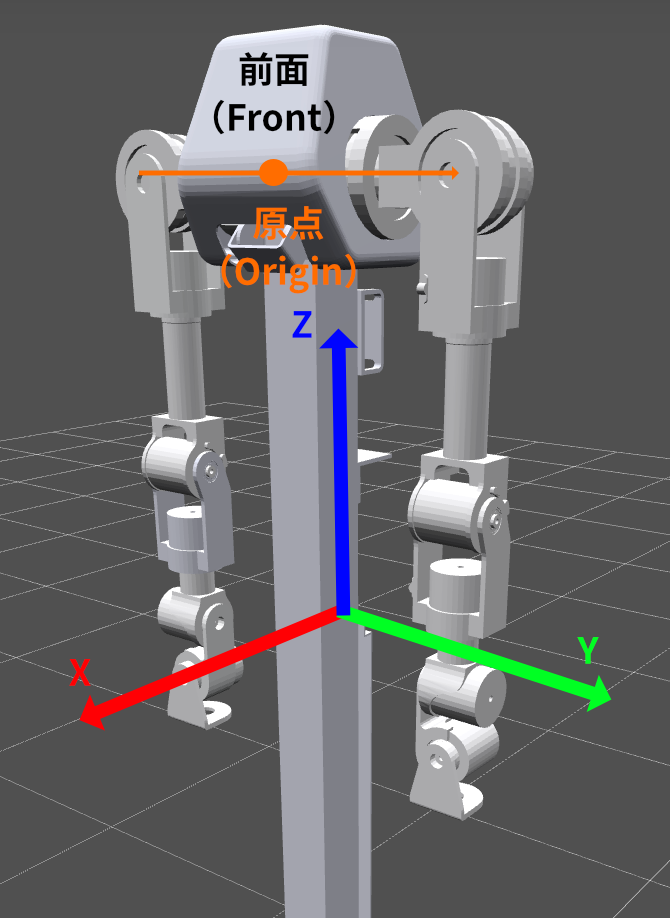
- X axis: Positive X points from the back of the robot toward the front
- Y axis: Positive Y points to the robot’s left side from the robot’s perspective (the viewer’s right when facing the robot)
- Z axis: Positive Z points upward by the right-hand rule
- Rx, Ry, Rz: Rotations are applied in Z, Y, X order, with counterclockwise as positive
Maestro Frame
The Maestro frame applies two transformations relative to the URDF frame, as shown below:
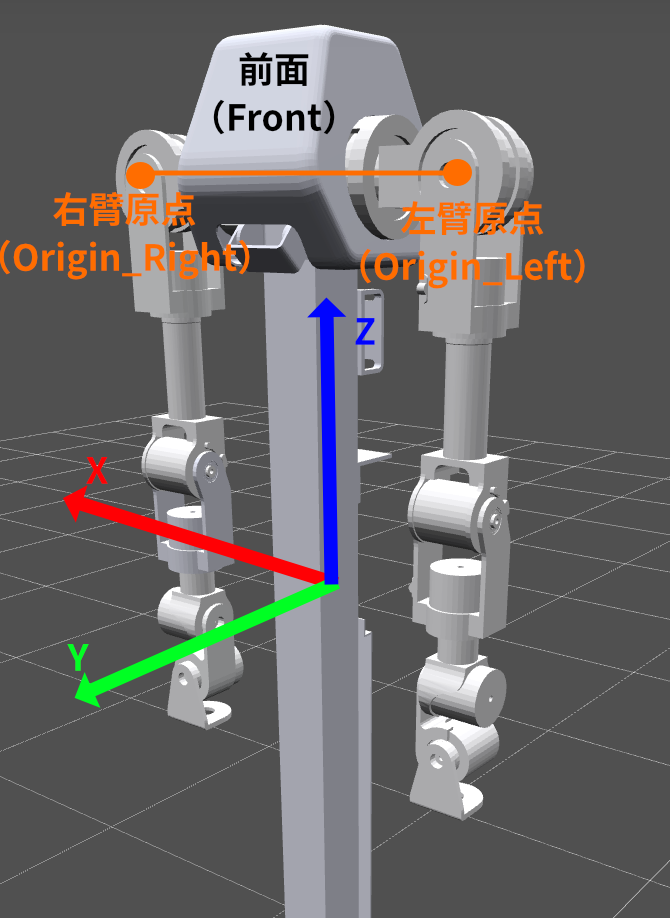
- Origin translation: Moves the world origin from the base center to the center of Joint 2 (the second shoulder joint)
- Rotate Z by 90°: Rotates the URDF axes counterclockwise by +90° around Z at the new origin
After the transformation:
- X axis: Positive X points to the robot’s right side from the robot’s perspective (the viewer’s left when facing the robot)
- Y axis: Positive Y points from the back of the robot toward the front
- Z axis: Positive Z points upward by the right-hand rule
Note: These coordinate definitions mainly affect the
Posevalues used bymove_pandmove_l. They do not affectmove_j.
Joint Definition
Zero Position
When all joint angles are [0.0, 0.0, 0.0, 0.0, 0.0, 0.0, 0.0], the arm should be in a natural hanging pose with joints perpendicular to each other. Call home() to return to the zero position, shown below:
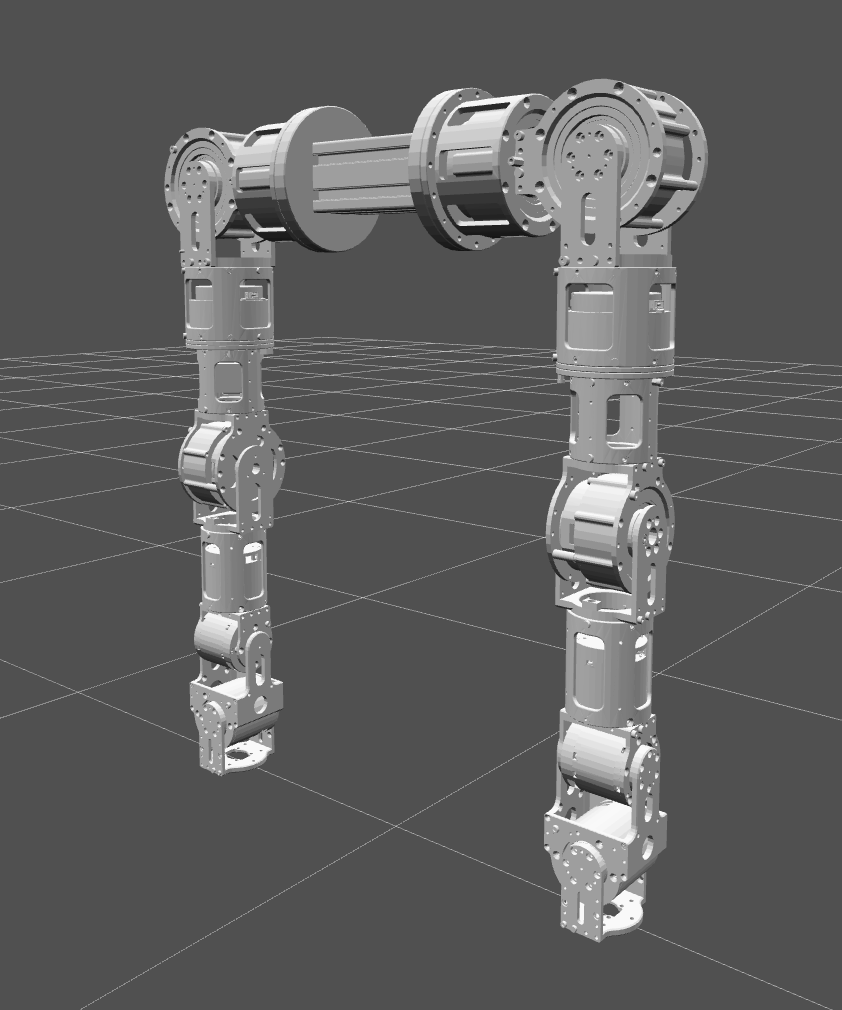
Positive Rotation Direction
Positive joint angles follow the right-hand rule: point your right thumb along the positive rotation axis, and the direction in which your fingers curl is the positive direction.
Because some URDF joint axes are negative (for example 0 -1 0), the actual positive direction may be opposite to intuition:
- Axis
0 -1 0(negative Y): Increasing the angle rotates around negative Y, which appears clockwise when looking along the positive Y axis - Axis
-1 0 0(negative X): Increasing the angle rotates around negative X, which appears clockwise when looking along the positive X axis - Axis
0 0 1(positive Z): Increasing the angle rotates around positive Z, which appears counterclockwise when viewed from above
A7 Lite Left Arm Joint List (URDF frame)
| Index | Joint name | Physical meaning | Rotation axis (URDF) | Angle range (rad) |
|---|---|---|---|---|
| 0 | L1_JOINT | Shoulder pitch | Negative Y (0 -1 0) | [-2.18, 3.75] |
| 1 | L2_JOINT | Shoulder roll | Negative X (-1 0 0) | [-3.33, 0.19] |
| 2 | L3_JOINT | Shoulder yaw (upper-arm twist) | Positive Z (0 0 1) | [-2.26, 2.26] |
| 3 | L4_JOINT | Elbow pitch | Negative Y (0 -1 0) | [-0.78, 1.74] |
| 4 | L5_JOINT | Elbow yaw (forearm twist) | Positive Z (0 0 1) | [-2.96, 2.96] |
| 5 | L6_JOINT | Wrist pitch | Negative Y (0 -1 0) | [-1.57, 1.57] |
| 6 | L7_JOINT | Wrist roll | Negative X (-1 0 0) | [-1.57, 1.57] |
A7 Lite Right Arm Joint List (URDF frame)
| Index | Joint name | Physical meaning | Rotation axis (URDF) | Angle range (rad) |
|---|---|---|---|---|
| 0 | R1_JOINT | Shoulder pitch | Positive Y (0 1 0) | [-3.75, 2.18] |
| 1 | R2_JOINT | Shoulder roll | Negative X (-1 0 0) | [-0.19, 3.33] |
| 2 | R3_JOINT | Shoulder yaw (upper-arm twist) | Positive Z (0 0 1) | [-2.26, 2.26] |
| 3 | R4_JOINT | Elbow pitch | Positive Y (0 1 0) | [-1.74, 0.78] |
| 4 | R5_JOINT | Elbow yaw (forearm twist) | Positive Z (0 0 1) | [-2.96, 2.96] |
| 5 | R6_JOINT | Wrist pitch | Positive Y (0 1 0) | [-1.57, 1.57] |
| 6 | R7_JOINT | Wrist roll | Negative X (-1 0 0) | [-1.57, 1.57] |
Pose (TCP Pose) Representation
Pose represents the TCP (Tool Center Point) pose. It is a Pydantic model with 6 fields:
from realhand import Pose
pose = Pose(x=0.3, y=0.1, z=0.5, rx=0.0, ry=0.5, rz=0.0)
| Field | Meaning | Unit |
|---|---|---|
x, y, z | Cartesian position | meters (m) |
rx | Rotation about X (roll), range [-π, π] | radians (rad) |
ry | Rotation about Y (pitch), range [-π/2, π/2] | radians (rad) |
rz | Rotation about Z (yaw), range [-π, π] | radians (rad) |
- Orientation uses extrinsic ZYX Euler angles: rotate around the world Z axis by
rz, then the world Y axis byry, and finally the world X axis byrx.
Lifecycle Management
API Reference
| Method | Description |
|---|---|
enable() | Enables all 7 joint motors. This causes a brief disable/enable cycle. |
disable() | Disables all 7 joint motors. |
emergency_stop() | Performs an emergency stop. This method blocks for about 2 seconds. |
calibrate_zero() | Sets the current position as zero. The arm must be disabled. |
reset_error() | Resets error states on all joints. |
close() | Closes the connection: waits for motion to finish and then stops the CAN scheduler. Called automatically when using with. |
Notes
- Calling
arm.enable()causes a brief disable/enable cycle. - The arm must be disabled before setting the zero position.
emergency_stop()is blocking and waits for about 2 seconds.
Control Mode
Only PP (Profile Position) mode is currently supported. It is configured automatically when enable() is called.
You can import the ControlMode enum from realhand:
from realhand import ControlMode
CAN Bus
interface_name specifies the CAN interface name (for example "can0"), and interface_type specifies the interface type (default "socketcan").
For more information, including Windows usage, see CAN Bus Configuration.
Functional Modules
| Module | Docs |
|---|---|
Motion control (move_j/move_p/move_l) | motion.md |
| Kinematics (FK / IK / joint limits) | kinematics.md |
| State reading (angles / speeds / torques / temperatures) | state.md |
| Parameter configuration (speed / acceleration / PID) | config.md |
Motion Control
Homing
Move all joints to the zero position ([0.0] * 7).
from realhand import A7lite
with A7lite(side="left", interface_name="can0") as arm:
arm.enable()
arm.home() # Blocking mode
arm.home(blocking=False) # Non-blocking mode
Parameter:
blocking: Whether to block until motion completes. Default isTrue.
move_j
Move the arm by sending target joint angles for each joint.
from realhand import A7lite
with A7lite(side="left", interface_name="can0") as arm:
arm.enable()
arm.move_j([0.0, 0.0, 0.0, 1.57, 0.0, 0.0, 0.0], blocking=True)
Parameters:
target_joints: Target angles for the 7 joints in radians, typelist[float]blocking: Whether to block until motion completes, defaultTrue, typebool
Exceptions:
StateError: Called again while the arm is already movingValidationError: Target angles exceed joint limits
move_p
Move the arm by sending a TCP 6D pose (x, y, z, rx, ry, rz). The SDK first solves inverse kinematics and then executes joint motion. The end-effector path is not guaranteed to be a straight line.
from realhand import A7lite
from realhand import Pose
with A7lite(side="left", interface_name="can0") as arm:
arm.enable()
target = Pose(x=0.3, y=0.1, z=0.5, rx=0.0, ry=0.5, rz=0.0)
arm.move_p(target)
Parameters:
target_pose: Target TCP pose, typePosecurrent_angles: Initial IK guess for joint angles, typelist[float] | None; whenNone, the SDK reads the motorsblocking: Whether to block until motion completes, typebool, defaultTrue
Exceptions:
StateError: Called again while the arm is already movingRuntimeError: IK solving failed
move_l
Move the arm in a straight line by sending a TCP 6D pose (x, y, z, rx, ry, rz). The end effector follows a straight Cartesian path. Position uses trapezoidal velocity planning, and orientation uses spherical linear interpolation (Slerp). move_l always blocks until motion completes and therefore has no blocking parameter.
from realhand import A7lite, Pose
with A7lite(side="left", interface_name="can0") as arm:
arm.enable()
target = Pose(x=0.0, y=0.33, z=-0.25, rx=1.85, ry=0.0, rz=-1.57)
arm.move_l(target, max_velocity=0.1, acceleration=0.2)
Parameters:
target_pose: Target TCP pose, typePosemax_velocity: Maximum linear speed for TCP trapezoidal planning in m/s, default0.05, range(0, 0.4]max_angular_velocity: Maximum angular speed for TCP rotation planning in rad/s, default0.3, range(0, 3.0]acceleration: Maximum linear acceleration for TCP trapezoidal planning in m/s², default0.1, range(0, 1.0]angular_acceleration: Maximum angular acceleration for TCP rotation planning in rad/s², default0.1, range(0, 1.0]current_pose: Starting TCP pose. IfNone, it is computed fromcurrent_anglesor by reading the motors. TypePose | Nonecurrent_angles: Starting joint angles. IfNone, they are read from the motors. Typelist[float] | None
Exceptions:
StateError: Called again while the arm is already movingValidationError: A parameter is out of rangeRuntimeError: IK failed for a path waypoint
Motion Status
Returns whether the arm is currently moving.
if arm.is_moving():
print("Arm is moving...")
Return value:
bool: Whether the arm is moving
Wait for Motion Completion
Block the current thread until the motion timer reaches zero. This is typically used together with blocking=False.
arm.move_j([0.0, 0.0, 0.0, 1.57, 0.0, 0.0, 0.0], blocking=False)
# ... do other work ...
arm.wait_motion_done() # Wait for motion to finish
Examples
Non-Blocking Motion and Waiting
from realhand import A7lite, Pose
with A7lite(side="left", interface_name="can0") as arm:
arm.enable()
arm.home()
# Non-blocking move_j: returns immediately after sending the command
arm.move_j([0.0, 0.0, 0.0, 1.57, 0.0, 0.0, 0.0], blocking=False)
print("move_j sent, arm is moving...")
arm.wait_motion_done() # Wait until the motion completes
# Blocking move_p: returns only after motion is done
target = Pose(x=0.0, y=0.33, z=-0.25, rx=1.85, ry=0.0, rz=-1.57)
arm.move_p(target)
# move_l is always blocking
target = Pose(x=0.1, y=0.33, z=-0.2, rx=1.85, ry=0.0, rz=-1.57)
arm.move_l(target, max_velocity=0.1, acceleration=0.2)
arm.home()
Kinematics
Forward Kinematics
Compute the TCP pose from joint angles.
pose = arm.forward_kinematics([0.0, 0.0, 0.0, 1.57, 0.0, 0.0, 0.0])
print(f"TCP: ({pose.x:.3f}, {pose.y:.3f}, {pose.z:.3f})")
Parameter:
angles: 7 joint angles in radians, typelist[float]
Return value:
Pose: TCP pose
Inverse Kinematics
Solve joint angles from a TCP pose.
from realhand import Pose
target = Pose(x=0.0, y=0.33, z=-0.25, rx=1.85, ry=0.0, rz=-1.57)
angles = arm.inverse_kinematics(target)
print(f"Joint angles: {angles}")
Parameters:
pose: Target TCP pose, typePosecurrent_angles: Initial IK guess for joint angles, typelist[float] | None; whenNone, the SDK reads the motors
Return value:
list[float]: 7 joint angles in radians
Joint Limits
# Read the current joint limits
limits = arm.get_joint_limits()
print(limits) # [(lower0, upper0), (lower1, upper1), ...]
# Set custom joint limits
arm.set_joint_limits([(-1.0, 1.0)] * 7)
State Reading
Full State Snapshot
Read the complete arm state in one call, including TCP pose plus angle, velocity, acceleration, torque, and temperature for all joints.
from realhand import A7lite
with A7lite(side="left", interface_name="can0") as arm:
arm.enable()
state = arm.get_state()
print(state.pose)
print(f"Actual angle of the first joint: {state.joint_angles[0].angle:.4f} rad")
Return value
State: Containspose,joint_angles,joint_control_angles,joint_velocities,joint_control_velocities,joint_control_acceleration,joint_torques, andjoint_temperatures
State data model
| Field | Description |
|---|---|
pose | TCP pose (Pose) |
joint_angles | Actual angles of the 7 joints (list[AngleState]) |
joint_control_angles | Control angles of the 7 joints (list[AngleState]) |
joint_velocities | Actual velocities of the 7 joints (list[VelocityState]) |
joint_control_velocities | Control velocities of the 7 joints (list[VelocityState]) |
joint_control_acceleration | Control accelerations of the 7 joints (list[AccelerationState]) |
joint_torques | Actual torques of the 7 joints (list[TorqueState]) |
joint_temperatures | Temperatures of the 7 joints (list[TemperatureState]) |
Each sub-state model (AngleState, VelocityState, etc.) includes a value field and a timestamp (Unix time in seconds).
Sub-state model fields
| Model | Value field | Timestamp field |
|---|---|---|
AngleState | .angle | .timestamp |
VelocityState | .velocity | .timestamp |
AccelerationState | .acceleration | .timestamp |
TorqueState | .torque | .timestamp |
TemperatureState | .temperature | .timestamp |
Read Individual State Items
Besides get_state(), the following methods return a single kind of state. All of them return lists for 7 joints, except get_pose().
from realhand import A7lite
with A7lite(side="left", interface_name="can0") as arm:
arm.enable()
angles = arm.get_angles()
velocities = arm.get_velocities()
temps = arm.get_temperatures()
pose = arm.get_pose()
print(f"Actual angle of the second joint: {angles[1]:.4f} rad")
print(f"Actual velocity of the third joint: {velocities[2]:.4f} rad/s")
print(f"Actual temperature of the fourth joint: {temps[3]:.1f} °C")
print(f"TCP: ({pose.x:.3f}m, {pose.y:.3f}m, {pose.z:.3f}m)")
Return values
| Method | Return value | Unit |
|---|---|---|
get_angles() | Actual angles of 7 joints | rad |
get_control_angles() | Control angles of 7 joints | rad |
get_velocities() | Actual velocities of 7 joints | rad/s |
get_control_velocities() | Control velocities of 7 joints | rad/s |
get_control_acceleration() | Control accelerations of 7 joints | rad/s² |
get_torques() | Actual torques of 7 joints | Nm |
get_temperatures() | Temperatures of 7 joints | °C |
get_pose() | TCP pose | m, rad |
Sensor Data
A7 Lite uses active motor reporting mode, which starts automatically during construction.
| Data type | Unit | Report rate |
|---|---|---|
| Angle | rad | Determined by motor report period |
| Velocity | rad/s | Same as above |
| Torque | Nm | Same as above |
| Temperature | °C | Same as above |
Configuration
Speed and Acceleration Limits
Set speed and acceleration limits for the 7 joints. These affect motions such as move_j and move_p.
from realhand import A7lite
with A7lite(side="left", interface_name="can0") as arm:
arm.enable()
# Set the speed limit of all joints to 2.0 rad/s
arm.set_velocities([2.0] * 7)
# Set acceleration limits individually
arm.set_accelerations([10.0, 9.0, 8.0, 7.0, 6.0, 5.0, 4.0])
| Method | Parameter | Range | Description |
|---|---|---|---|
set_velocities(velocities) | Velocity limits for 7 joints (rad/s) | [0.0, 50.0] | Default 0.5 |
set_accelerations(accelerations) | Acceleration limits for 7 joints (rad/s²) | [1.0, 50.0] | Default 10.0 |
Exception: ValidationError (exactly 7 values are required, and all values must be within range)
PID Parameter Settings
Set PID parameters for the 7 joints.
from realhand import A7lite
with A7lite(side="left", interface_name="can0") as arm:
arm.set_position_kps([100.0] * 7)
arm.set_velocity_kps([0.5] * 7)
arm.set_velocity_kis([0.01] * 7)
arm.set_velocity_filt_gains([0.8] * 7)
| Method | Parameter | Description |
|---|---|---|
set_position_kps(kps) | Position Kp values for 7 joints | Proportional gain of the position loop |
set_velocity_kps(kps) | Velocity Kp values for 7 joints | Proportional gain of the velocity loop |
set_velocity_kis(kis) | Velocity Ki values for 7 joints | Integral gain of the velocity loop |
set_velocity_filt_gains(gains) | Velocity filter gains for 7 joints | Higher gain means stronger filtering and slower response |
Parameter Quick Reference
| Parameter type | Default | Range |
|---|---|---|
| Speed limit | 0.5 rad/s | [0.0, 50.0] rad/s |
| Acceleration limit | 10.0 rad/s² | [1.0, 50.0] rad/s² |
move_l max linear speed | 0.05 m/s | (0, 0.4] m/s |
move_l max angular speed | 0.3 rad/s | (0, 3.0] rad/s |
move_l linear acceleration | 0.1 m/s² | (0, 1.0] m/s² |
move_l angular acceleration | 0.1 rad/s² | (0, 1.0] rad/s² |
Example
Set PID, Speed, and Acceleration Limits
from realhand import A7lite
with A7lite(side="left", interface_name="can0") as arm:
arm.set_position_kps([80.0] * 7)
arm.set_velocity_kps([0.4] * 7)
arm.set_velocity_kis([0.008] * 7)
arm.set_velocity_filt_gains([0.9] * 7)
arm.set_velocities([1.0] * 7)
arm.set_accelerations([5.0] * 7)
A7 Arm
A7 is a self-developed 7-DoF robotic arm.
Quick Start
from realhand import A7
with A7(
side="left",
interface_name="can0",
) as arm:
arm.enable() # Enable all 7 joint motors
arm.home() # Move the arm to the zero position
arm.disable() # Disable all 7 joint motors
Constructor Parameters
| Parameter | Type | Default | Description |
|---|---|---|---|
side | "left" | "right" | required | Left arm or right arm |
interface_name | str | required | CAN interface name, such as "can0" |
interface_type | str | "socketcan" | CAN interface type |
tcp_offset | list[float] | [0.0, 0.0, 0.0] | TCP offset |
world_frame | "urdf" | "maestro" | "urdf" | World frame convention |
The constructor automatically checks whether all 7 motors are online.
Dependency requirement: A7 relies on Pinocchio for kinematics. Install the optional kinetix dependency:
pip install "realhand[kinetix] @ git+https://github.com/RealHand-Robotics/realbot-python-sdk.git"
Windows users: Pinocchio does not support installation via
pipon Windows. Useconda install pinocchio -c conda-forge.
Exceptions:
ImportError: The optionalkinetixdependency (Pinocchio) is not installedValueError: Invalidsideorworld_frameargumentStateError: Motors did not respond on the CAN bus / initial data read failed
URDF paths:
src/realhand/arm/kinetix/urdf/a7__left.urdfanda7__right.urdf
Coordinate Frames
A7 supports two world coordinate frames selected by the world_frame parameter.
URDF Frame (default)
This is the coordinate system defined by the URDF model file. Its origin is at the center of the arm base (Base_Link), as shown below:
- X axis: Positive X points from the back of the robot toward the front
- Y axis: Positive Y points to the robot’s left side from the robot’s perspective (the viewer’s right when facing the robot)
- Z axis: Positive Z points upward by the right-hand rule
- Rx, Ry, Rz: Rotations are applied in Z, Y, X order, with counterclockwise as positive
Maestro Frame
The Maestro frame applies two transformations relative to the URDF frame, as shown below:
- Origin translation: Moves the world origin from the base center to the center of Joint 2 (the second shoulder joint)
- Rotate Z by 90°: Rotates the URDF axes counterclockwise by +90° around Z at the new origin
After the transformation:
- X axis: Positive X points to the robot’s right side from the robot’s perspective (the viewer’s left when facing the robot)
- Y axis: Positive Y points from the back of the robot toward the front
- Z axis: Positive Z points upward by the right-hand rule
Note: These coordinate definitions mainly affect the
Posevalues used bymove_pandmove_l. They do not affectmove_j.
Joint Definition
Zero Position
When all joint angles are [0.0, 0.0, 0.0, 0.0, 0.0, 0.0, 0.0], the arm should be in a natural hanging pose with joints perpendicular to each other. Call home() to return to the zero position, shown below:
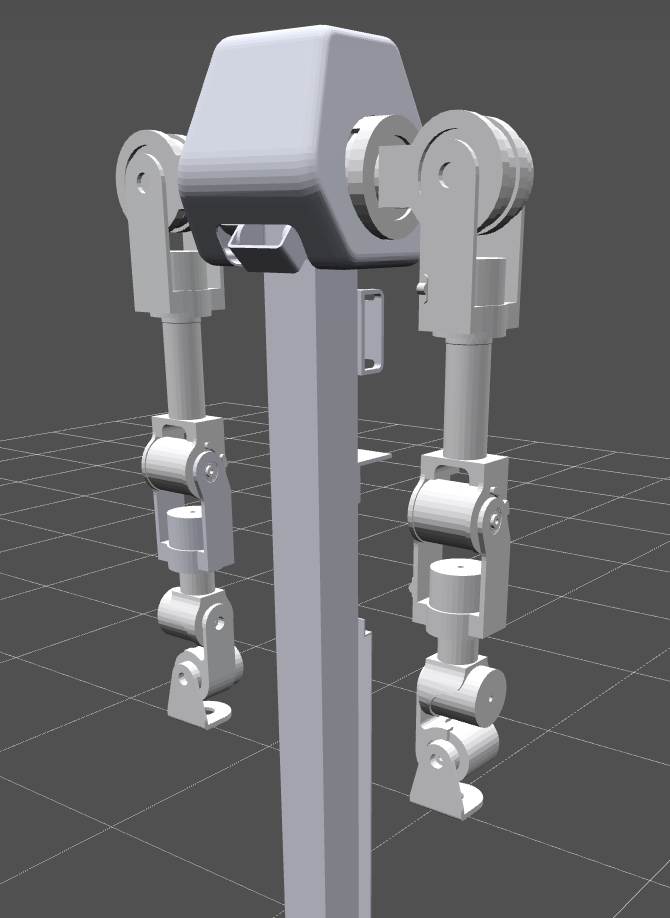
Positive Rotation Direction
Positive joint angles follow the right-hand rule: point your right thumb along the positive rotation axis, and the direction in which your fingers curl is the positive direction.
- Axis
0 1 0(positive Y): Angle increases rotate counterclockwise when viewed along +Y - Axis
1 0 0(positive X): Angle increases rotate counterclockwise when viewed along +X - Axis
0 0 -1(negative Z): Angle increases rotate clockwise when viewed from above - Axis
0 -1 0(negative Y): Angle increases rotate clockwise when viewed along +Y
A7 Left Arm Joint List (URDF frame)
| Index | Joint name | Physical meaning | Rotation axis (URDF) | Angle range (rad) |
|---|---|---|---|---|
| 0 | Left_Shoulder_Pitch_Joint | Shoulder pitch | Positive Y (0 1 0) | [-2.97, 1.05] |
| 1 | Left_Shoulder_Roll_Joint | Shoulder roll | Positive X (1 0 0) | [-0.35, 3.49] |
| 2 | Left_Shoulder_Yaw_Joint | Shoulder yaw (upper-arm twist) | Negative Z (0 0 -1) | [-2.79, 2.79] |
| 3 | Left_Elbow_Pitch_Joint | Elbow pitch | Negative Y (0 -1 0) | [-0.21, 2.355] |
| 4 | Left_Wrist_Yaw_Joint | Wrist yaw (forearm twist) | Negative Z (0 0 -1) | [-2.79, 2.79] |
| 5 | Left_Wrist_Pitch_Joint | Wrist pitch | Negative Y (0 -1 0) | [-1.57, 1.57] |
| 6 | Left_Wrist_Roll_Joint | Wrist roll | Positive X (1 0 0) | [-1.57, 1.57] |
A7 Right Arm Joint List (URDF frame)
| Index | Joint name | Physical meaning | Rotation axis (URDF) | Angle range (rad) |
|---|---|---|---|---|
| 0 | Right_Shoulder_Pitch_Joint | Shoulder pitch | Negative Y (0 -1 0) | [-1.05, 2.97] |
| 1 | Right_Shoulder_Roll_Joint | Shoulder roll | Positive X (1 0 0) | [-3.49, 0.35] |
| 2 | Right_Shoulder_Yaw_Joint | Shoulder yaw (upper-arm twist) | Negative Z (0 0 -1) | [-2.79, 2.79] |
| 3 | Right_Elbow_Pitch_Joint | Elbow pitch | Negative Y (0 -1 0) | [-0.21, 2.355] |
| 4 | Right_Wrist_Yaw_Joint | Wrist yaw (forearm twist) | Negative Z (0 0 -1) | [-2.79, 2.79] |
| 5 | Right_Wrist_Pitch_Joint | Wrist pitch | Positive Y (0 1 0) | [-1.57, 1.57] |
| 6 | Right_Wrist_Roll_Joint | Wrist roll | Positive X (1 0 0) | [-1.57, 1.57] |
Pose (TCP Pose) Representation
Pose represents the TCP (Tool Center Point) pose. It is a Pydantic model with 6 fields:
from realhand import Pose
pose = Pose(x=0.3, y=0.1, z=0.5, rx=0.0, ry=0.5, rz=0.0)
| Field | Meaning | Unit |
|---|---|---|
x, y, z | Cartesian position | meters (m) |
rx | Rotation about X (roll), range [-π, π] | radians (rad) |
ry | Rotation about Y (pitch), range [-π/2, π/2] | radians (rad) |
rz | Rotation about Z (yaw), range [-π, π] | radians (rad) |
- Orientation uses extrinsic ZYX Euler angles: rotate around the world Z axis by
rz, then the world Y axis byry, and finally the world X axis byrx.
Lifecycle Management
API Reference
| Method | Description |
|---|---|
enable() | Enables all 7 joint motors. This causes a brief disable/enable cycle. |
disable() | Disables all 7 joint motors. |
emergency_stop() | Performs an emergency stop and locks the arm at its current pose. |
calibrate_zero() | Sets the current position as zero. The arm must be disabled. |
reset_error() | Resets error states on all joints. |
close() | Closes the connection: stops polling and stops the CAN scheduler after waiting for motion to finish. Called automatically when using with. |
save_params() | Saves current PID and other parameters to motor flash so they persist after power loss. |
Notes
- Calling
arm.enable()causes a brief disable/enable cycle. - The arm must be disabled before setting the zero position.
Control Mode
Only PP (Profile Position) mode is currently supported. It is configured automatically when enable() is called.
You can import the ControlMode enum from realhand:
from realhand import ControlMode
CAN Bus
interface_name specifies the CAN interface name (for example "can0"), and interface_type specifies the interface type (default "socketcan").
For more information, including Windows usage, see CAN Bus Configuration.
Functional Modules
| Module | Docs |
|---|---|
Motion control (move_j/move_p/move_l) | motion.md |
| Kinematics (FK / IK / joint limits) | kinematics.md |
| State reading (angles / speeds / torques / temperatures) | state.md |
| Parameter configuration (speed / acceleration / PID) | config.md |
Motion Control
Homing
Move all joints back to the zero position.
from realhand import A7
with A7(side="left", interface_name="can0") as arm:
arm.enable()
arm.home() # Blocking mode
arm.home(blocking=False) # Non-blocking mode
Parameter:
blocking: Whether to block until motion completes. Default isTrue.
move_j
Move the arm by sending target joint angles for each joint.
from realhand import A7
with A7(side="left", interface_name="can0") as arm:
arm.enable()
arm.move_j([0.0, 0.0, 0.0, 1.57, 0.0, 0.0, 0.0])
Parameters:
target_joints: Target angles for the 7 joints in radians, typelist[float]blocking: Whether to block until motion completes, defaultTrue, typebool
Exceptions:
StateError: Called again while the arm is already movingValidationError: Target angles exceed joint limits
move_p
Move the arm by sending a TCP 6D pose (x, y, z, rx, ry, rz). The SDK first solves inverse kinematics and then executes joint motion. The end-effector path is not guaranteed to be a straight line.
from realhand import A7, Pose
with A7(side="left", interface_name="can0") as arm:
arm.enable()
target = Pose(x=0.0, y=0.33, z=-0.25, rx=1.85, ry=0.0, rz=-1.57)
arm.move_p(target)
Parameters:
target_pose: Target TCP pose, typerealhand.arm.Posecurrent_angles: Initial IK guess for joint angles, typelist[float] | None; whenNone, the SDK reads the motorsblocking: Whether to block until motion completes, typebool, defaultTrue
Exceptions:
StateError: Called again while the arm is already movingRuntimeError: IK solving failed
move_l
Move the arm in a straight line by sending a TCP 6D pose (x, y, z, rx, ry, rz). The end effector follows a straight Cartesian path. Position uses trapezoidal velocity planning, and orientation uses spherical linear interpolation (Slerp). move_l always blocks until motion completes and therefore has no blocking parameter.
from realhand import A7, Pose
with A7(side="left", interface_name="can0") as arm:
arm.enable()
target = Pose(x=0.0, y=0.33, z=-0.25, rx=1.85, ry=0.0, rz=-1.57)
arm.move_l(target)
Parameters:
target_pose: Target TCP pose, typePosemax_velocity: Maximum linear speed for TCP trapezoidal planning in m/s, default0.05, range(0, 0.4]max_angular_velocity: Maximum angular speed for TCP rotation planning in rad/s, default0.3, range(0, 3.0]acceleration: Maximum linear acceleration for TCP trapezoidal planning in m/s², default0.1, range(0, 1.0]angular_acceleration: Maximum angular acceleration for TCP rotation planning in rad/s², default0.1, range(0, 1.0]current_pose: Starting TCP pose. IfNone, it is computed fromcurrent_anglesor by reading the motors. TypePose | Nonecurrent_angles: Starting joint angles. IfNone, they are read from the motors. Typelist[float] | None
Exceptions:
StateError: Called again while the arm is already movingValidationError: A parameter is out of rangeRuntimeError: IK failed for a path waypoint
Motion Status
Returns whether the arm is currently moving.
if arm.is_moving():
print("Arm is moving...")
Return value:
bool: Whether the arm is moving
Wait for Motion Completion
Block the current thread until the motion timer reaches zero. This is typically used together with blocking=False.
arm.move_j([0.0, 0.0, 0.0, 1.57, 0.0, 0.0, 0.0], blocking=False)
# ... do other work ...
arm.wait_motion_done() # Wait for motion to finish
Examples
Non-Blocking Motion and Waiting
from realhand import A7, Pose
with A7(side="left", interface_name="can0") as arm:
arm.enable()
arm.home()
# Set speed and acceleration
arm.set_velocities([1.0] * 7)
arm.set_accelerations([10.0] * 7)
# Non-blocking move_j: returns immediately after sending the command
arm.move_j([0.0, 0.0, 0.0, 1.57, 0.0, 0.0, 0.0], blocking=False)
print("move_j sent, arm is moving...")
arm.wait_motion_done() # Wait until the motion completes
# Blocking move_p: returns only after motion is done
target = Pose(x=0.0, y=0.33, z=-0.25, rx=1.85, ry=0.0, rz=-1.57)
arm.move_p(target)
# move_l is always blocking
target = Pose(x=0.1, y=0.33, z=-0.2, rx=1.85, ry=0.0, rz=-1.57)
arm.move_l(target)
arm.home()
Kinematics
Forward Kinematics
Compute the TCP pose from joint angles.
pose = arm.forward_kinematics([0.0, 0.0, 0.0, 1.57, 0.0, 0.0, 0.0])
print(f"TCP: ({pose.x:.3f}, {pose.y:.3f}, {pose.z:.3f})")
Parameter:
angles: 7 joint angles in radians, typelist[float]
Return value:
Pose: TCP pose
Inverse Kinematics
Solve joint angles from a TCP pose.
from realhand import Pose
target = Pose(x=0.0, y=0.33, z=-0.25, rx=1.85, ry=0.0, rz=-1.57)
angles = arm.inverse_kinematics(target)
print(f"Joint angles: {angles}")
Parameters:
pose: Target TCP pose, typePosecurrent_angles: Initial IK guess for joint angles, typelist[float] | None; whenNone, the SDK reads the motors
Return value:
list[float]: 7 joint angles in radians
Joint Limits
# Read the current joint limits
limits = arm.get_joint_limits()
print(limits) # [(lower0, upper0), (lower1, upper1), ...]
# Set custom joint limits
arm.set_joint_limits([(-1.0, 1.0)] * 7)
State Reading
Full State Snapshot
Read the complete arm state in one call, including TCP pose plus angle, velocity, acceleration, torque, and temperature for all joints.
from realhand import A7
with A7(side="left", interface_name="can0") as arm:
arm.enable()
state = arm.get_state()
print(state.pose)
print(f"Actual angle of the first joint: {state.joint_angles[0].angle:.4f} rad")
Return value
State: Containspose,joint_angles,joint_control_angles,joint_velocities,joint_control_velocities,joint_control_acceleration,joint_torques, andjoint_temperatures
State data model
| Field | Description |
|---|---|
pose | TCP pose (Pose) |
joint_angles | Actual angles of the 7 joints (list[AngleState]) |
joint_control_angles | Control angles of the 7 joints (list[AngleState]) |
joint_velocities | Actual velocities of the 7 joints (list[VelocityState]) |
joint_control_velocities | Control velocities of the 7 joints (list[VelocityState]) |
joint_control_acceleration | Control accelerations of the 7 joints (list[AccelerationState]) |
joint_torques | Actual torques of the 7 joints (list[TorqueState]) |
joint_temperatures | Temperatures of the 7 joints (list[TemperatureState]) |
Each sub-state model includes a value field and a timestamp (Unix time in seconds).
Sub-state model fields
| Model | Value field | Timestamp field |
|---|---|---|
AngleState | .angle | .timestamp |
VelocityState | .velocity | .timestamp |
AccelerationState | .acceleration | .timestamp |
TorqueState | .torque | .timestamp |
TemperatureState | .temperature | .timestamp |
Read Individual State Items
Besides get_state(), the following methods return a single kind of state. All of them return lists for 7 joints, except get_pose().
from realhand import A7
with A7(side="left", interface_name="can0") as arm:
arm.enable()
angles = arm.get_angles()
velocities = arm.get_velocities()
temps = arm.get_temperatures()
pose = arm.get_pose()
print(f"Actual angle of the second joint: {angles[1]:.4f} rad")
print(f"Actual velocity of the third joint: {velocities[2]:.4f} rad/s")
print(f"Actual temperature of the fourth joint: {temps[3]:.1f} °C")
print(f"TCP: ({pose.x:.3f}m, {pose.y:.3f}m, {pose.z:.3f}m)")
Return values
| Method | Return value | Unit |
|---|---|---|
get_angles() | Actual angles of 7 joints | rad |
get_control_angles() | Control angles of 7 joints | rad |
get_velocities() | Actual velocities of 7 joints | rad/s |
get_control_velocities() | Control velocities of 7 joints | rad/s |
get_control_acceleration() | Control accelerations of 7 joints | rad/s² |
get_torques() | Actual torques of 7 joints | Nm |
get_temperatures() | Temperatures of 7 joints | °C |
get_pose() | TCP pose | m, rad |
Sensor Data
A7 uses polling to collect sensor data. get_*() returns the value from the latest polling cycle.
| Data type | Unit | Default polling interval | Maximum delay |
|---|---|---|---|
| Angle | rad | 10 ms | ≈ 10 ms |
| Velocity | rad/s | 10 ms | ≈ 10 ms |
| Torque | Nm | 50 ms | ≈ 50 ms |
| Temperature | °C | 1000 ms | ≈ 1000 ms |
If you need lower latency, use start_polling() to configure different intervals for different sensor types:
from realhand import A7
from realhand.arm.a7 import SensorType
with A7(side="left", interface_name="can0") as arm:
arm.start_polling(
{
SensorType.POSITION: 0.005, # 5 ms = 200 Hz
SensorType.VELOCITY: 0.005,
SensorType.TORQUE: 0.1,
SensorType.TEMPERATURE: 2.0,
}
)
arm.enable()
arm.home()
Configuration
Speed and Acceleration Limits
Set speed and acceleration limits for the 7 joints.
from realhand import A7
with A7(side="left", interface_name="can0") as arm:
arm.enable()
# Set the speed limit of all joints to 1.0 rad/s
arm.set_velocities([1.0] * 7)
# Set acceleration limits individually
arm.set_accelerations([10.0, 9.0, 8.0, 7.0, 6.0, 5.0, 4.0])
| Method | Parameter | Range | Description |
|---|---|---|---|
set_velocities(velocities) | Velocity limits for 7 joints (rad/s) | [0.0, 50.0] | Default 0.5 |
set_accelerations(accelerations) | Acceleration limits for 7 joints (rad/s²) | [1.0, 50.0] | Default 10.0; sets acceleration and deceleration together |
Exception: ValidationError (exactly 7 values are required, and all values must be within range)
PID Parameter Settings
Set PID parameters for the 7 joints.
from realhand import A7
with A7(side="left", interface_name="can0") as arm:
arm.set_position_kps([100.0] * 7)
arm.set_velocity_kps([0.5] * 7)
arm.set_velocity_kis([0.01] * 7)
| Method | Parameter | Description |
|---|---|---|
set_position_kps(kps) | Position Kp values for 7 joints | Proportional gain of the position loop |
set_velocity_kps(kps) | Velocity Kp values for 7 joints | Proportional gain of the velocity loop |
set_velocity_kis(kis) | Velocity Ki values for 7 joints | Integral gain of the velocity loop |
Parameter Quick Reference
| Parameter type | Default | Range |
|---|---|---|
| Speed limit | 0.5 rad/s | [0.0, 50.0] rad/s |
| Acceleration limit | 10.0 rad/s² | [1.0, 50.0] rad/s² |
move_l max linear speed | 0.05 m/s | (0, 0.4] m/s |
move_l max angular speed | 0.3 rad/s | (0, 3.0] rad/s |
move_l linear acceleration | 0.1 m/s² | (0, 1.0] m/s² |
move_l angular acceleration | 0.1 rad/s² | (0, 1.0] rad/s² |
Example
Move After Setting PID, Speed, and Acceleration Limits
from realhand import A7
with A7(side="left", interface_name="can0") as arm:
arm.set_position_kps([80.0] * 7)
arm.set_velocity_kps([0.4] * 7)
arm.set_velocity_kis([0.008] * 7)
arm.enable()
arm.set_velocities([1.0] * 7)
arm.set_accelerations([10.0] * 7)
arm.home(blocking=True)
arm.move_j([0.0, 0.0, 0.0, 1.57, 0.0, 0.0, 0.0], blocking=True)
Parameter Persistence
Call save_params() to write the current PID, speed, acceleration, and related parameters to motor flash so they remain effective after power loss.
from realhand import A7
with A7(side="left", interface_name="can0") as arm:
arm.set_position_kps([80.0] * 7)
arm.set_velocity_kps([0.4] * 7)
arm.save_params() # Save to flash
Note: Each write takes about 1 ms. Avoid calling this in real-time control loops.